AI Image to Video: Transform, Edit, and Bring Images to Life
Medeo's all-in-one AI image to video generator combines leading AI models with a proprietary creative workflow. Simply chat to edit, transform, and animate any picture or photo, then enhance it with voiceovers, sound effects, and frame-by-frame refinement—all without any editing experience. Free to try.
Powered by world-class AI models


Take Full Control of Your AI Image to Video Creation

Turn Any Image into Stunning AI Videos
See how your photos come to life with AI-powered video generation
Bring Your Image to Life
Animate photos, illustrations, and AI artwork with smooth, realistic motion in just a few clicks. Turn static visuals into dynamic, eye-catching AI videos for social media, marketing, or personal projects.
Add Music, Sound Effects, and Captions
Create richer videos with custom background music, AI sound effects, and subtitles—all generated in one workflow. Produce polished, ready-to-share content without switching between multiple editing tools.
Edit and Refine with Simple Chat
Modify scenes, replace objects, adjust styles, and fine-tune every detail through natural language, no editing skills required. Simply describe the changes you want, and let Medeo handle the rest.
Take Full Control of Your AI Image to Video Creation
Restyle Images While Generating Videos
Adjust styles, moods, and visual direction with simple prompts throughout the image to video process.
| Image | Prompt | Output Video |
|---|---|---|
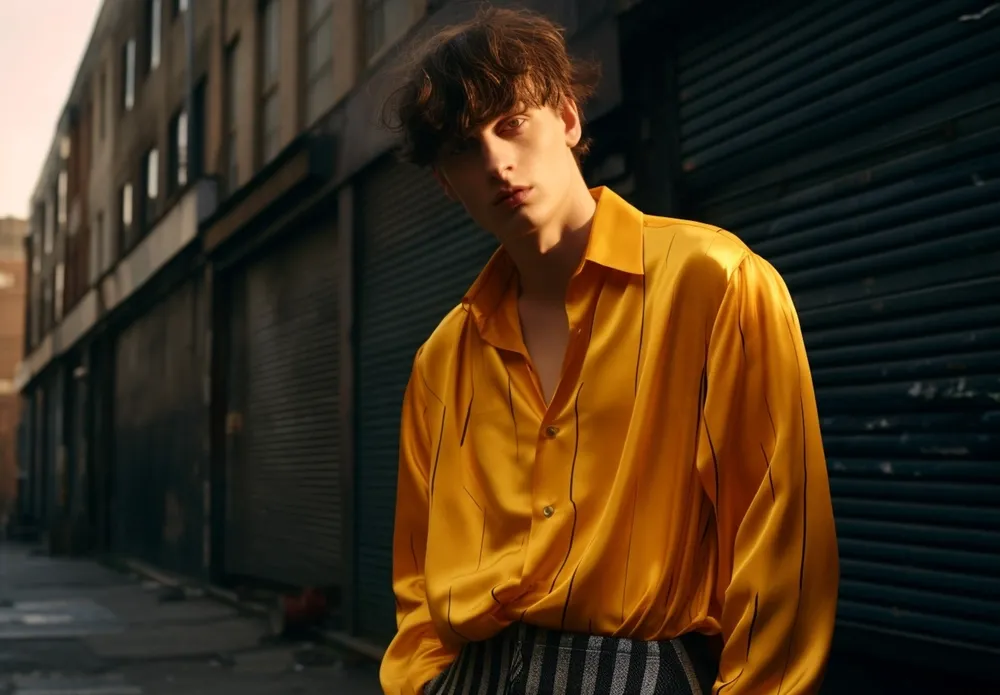 | Transform this male model into the star of a high-fashion editorial film. Preserve his identity while creating a bold, avant-garde magazine cover aesthetic inspired by Vogue and Dazed. Add subtle natural movement, intense eye contact, and slow cinematic camera motion. Use strong high-contrast lighting with fearless color blocking—deep black, pure white, vivid red, and electric blue. Avoid gradients and soft tones. Surround the model with dynamic graphic shadows, geometric shapes, and animated editorial typography, creating the feeling of a living luxury fashion magazine cover. |
Replace or Modify Any Element Instantly
Edit characters, objects, or backgrounds on the fly without restarting your AI video generation.
| Image | Prompt | Output Video |
|---|---|---|
 | Animate the scene naturally with subtle movements. Keep the boy, his pose, and the environment unchanged while the companion beside him smoothly transforms from a puppy into a fox, then a baby dragon, and finally a small floating robot. |
Expand and Enhance Scenes Naturally
Extend image boundaries and improve visual details to create richer, more immersive AI videos.
| Image | Prompt | Output Video |
|---|---|---|
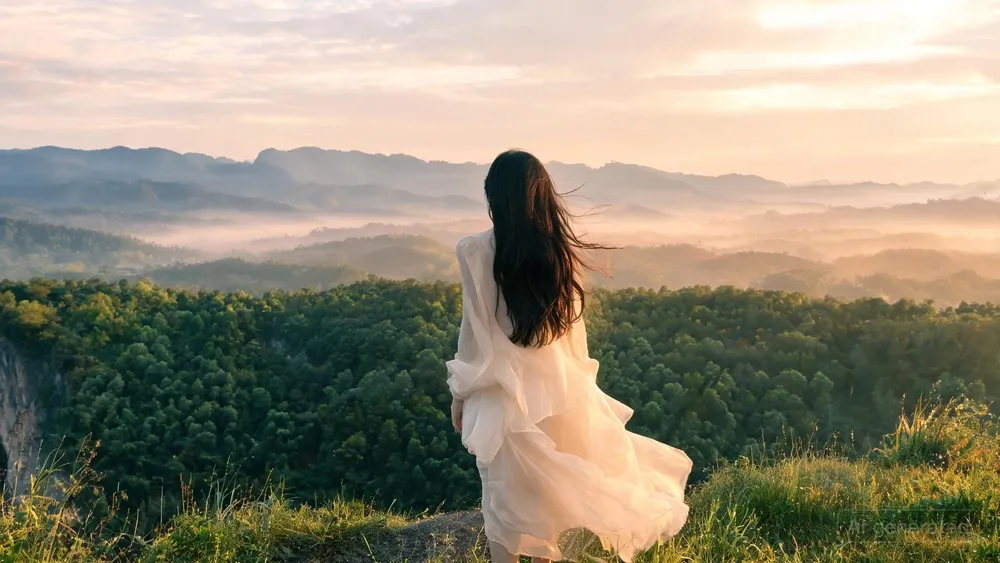 | Start with a close-up view of the young woman standing on the edge of a cliff. Slowly zoom the camera outward while naturally extending the surrounding environment beyond the original image boundaries. Reveal vast mountains, forests, rivers, drifting clouds, and flying birds, creating the feeling that the world is continuously expanding. Maintain seamless visual quality and cinematic realism throughout the shot. |
Keep Characters and Motion Consistent
Maintain identity, appearance, and scene continuity across every frame for smoother, more coherent video results.
| Image | Prompt | Output Video |
|---|---|---|
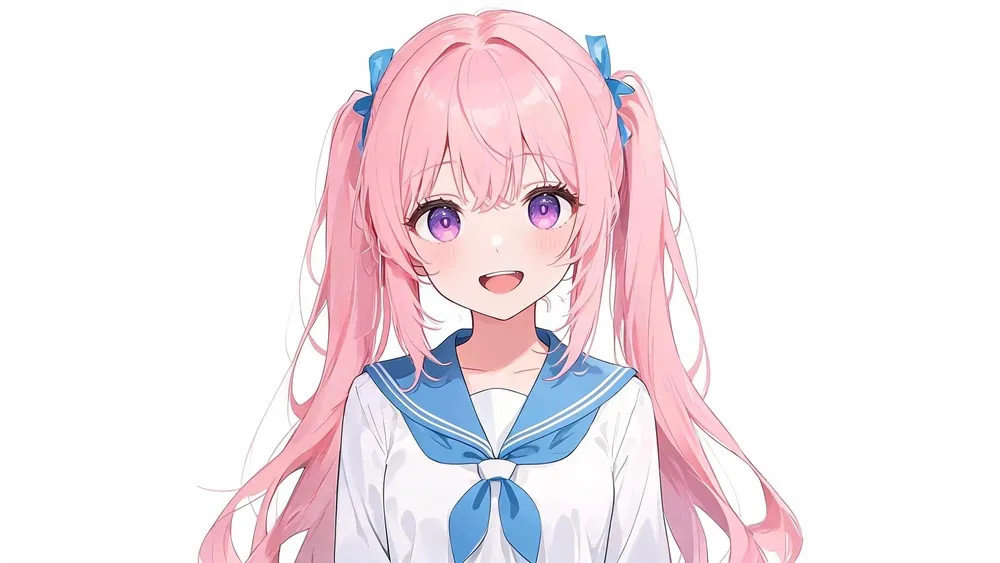 | Create a smooth anime-style animation with the character running gently, turning her head, and waving to the camera. Preserve the exact same face, hairstyle, eye color, clothing details, and overall design throughout every frame. Ensure perfect character consistency during all movements. |
AI Image to Video for Every Creative Need
Whether you're creating content, promoting a brand, or showcasing products, Medeo helps you turn any photo into a compelling AI video. Transform photos, artwork, and designs into engaging visual stories with realistic motion, sound, and creative control.
For Content Creators
Turn photos, AI art, and illustrations into eye-catching videos for YouTube, TikTok, Reels, and other short-form platforms. Generate unique content faster, experiment with different styles, and keep your audience engaged without complex editing.
For Marketers
Transform product images, campaign assets, and promotional visuals into high-converting AI videos. Add motion, music, captions, and cinematic effects to create ads and social content that capture attention and drive results.
For Designers
Bring concepts, mood boards, and creative artwork to life with realistic animation while preserving your artistic vision. Quickly visualize ideas, explore different aesthetics, and present designs in a more immersive format.
For Social Media
Create scroll-stopping AI videos from static images with dynamic motion, custom sound effects, background music, and subtitles. Produce platform-ready content for TikTok, Instagram, YouTube Shorts, and more in just minutes.
For Product Showcases
Convert product photos into polished demos and promotional videos without expensive shoots or editing software. Highlight details, create lifestyle scenes, and generate professional marketing assets from a single image.
How to Turn an Image into a Video with Medeo
Step 1
Upload your image
Upload any photo to get started. Medeo supports a wide range of image styles, making it easy to turn your ideas into motion.
Step 2
Describe your edits or motion
Simply tell Medeo what you want. Add movement, change styles, replace objects, or generate music, sound effects, and captions using natural language prompts.
Step 3
Generate and download
Choose your preferred AI model and let Medeo create your video in seconds. Preview the result, make additional refinements if needed, and download a high-quality video ready to share.
See What You Can Create with Medeo AI Video Generator
FAQs about Image to Video AI
Explore More Leading AI Video Models and Tools in Medeo
See Why Creators Choose Medeo AI Video Generator
"Medeo has completely changed the way I create visual content. Instead of juggling multiple AI tools, I can generate images, videos, and edits all in one conversation. "
Sarah Mitchell
Content Creator
"We use Medeo to create ad creatives and social content at scale. The quality is surprisingly consistent, and the workflow feels much more intuitive."
David Chen
Digital Marketing Manager
"What impressed me most is how well Medeo understands context. I can upload references, describe changes naturally, and get results that are remarkably close to my vision."
Emma Rodriguez
Graphic Designer
"Product photography used to be one of our biggest expenses. With Medeo, we can generate professional product visuals and promotional videos in minutes."
Michael Thompson
E-commerce Store Owner
"Medeo has completely changed the way I create visual content. Instead of juggling multiple AI tools, I can generate images, videos, and edits all in one conversation. "
Sarah Mitchell
Content Creator
"We use Medeo to create ad creatives and social content at scale. The quality is surprisingly consistent, and the workflow feels much more intuitive."
David Chen
Digital Marketing Manager
"What impressed me most is how well Medeo understands context. I can upload references, describe changes naturally, and get results that are remarkably close to my vision."
Emma Rodriguez
Graphic Designer
"Product photography used to be one of our biggest expenses. With Medeo, we can generate professional product visuals and promotional videos in minutes."
Michael Thompson
E-commerce Store Owner
"The image-to-video feature is incredible. Turning static visuals into engaging short-form videos has helped us increase engagement across multiple platforms."
Jessica Park
Social Media Specialist
"I've tested dozens of AI creative tools, but Medeo stands out because it combines image generation, editing, and video creation in a single workflow."
Ryan Foster
YouTube Creator
"Medeo helps our team move from idea to execution much faster. It's become an essential part of our content production process."
Olivia Bennett
Brand Strategist
"Whether I start with a prompt, an image, or a video reference, Medeo adapts seamlessly. It feels more like collaborating with a creative assistant than using software."
Kevin Lee
Freelance Creative Director
"The image-to-video feature is incredible. Turning static visuals into engaging short-form videos has helped us increase engagement across multiple platforms."
Jessica Park
Social Media Specialist
"I've tested dozens of AI creative tools, but Medeo stands out because it combines image generation, editing, and video creation in a single workflow."
Ryan Foster
YouTube Creator
"Medeo helps our team move from idea to execution much faster. It's become an essential part of our content production process."
Olivia Bennett
Brand Strategist
"Whether I start with a prompt, an image, or a video reference, Medeo adapts seamlessly. It feels more like collaborating with a creative assistant than using software."
Kevin Lee
Freelance Creative Director
Learn More About AI Picture to Video
7 Best AI Love Story Video Generators in 2026 (Tested & Compared)
Discover the 7 best AI love story video generators in 2026 — tested and compared. From cinematic narratives to anniversary films, find the right tool for every romantic occasion.
TIAN YUAN · Apr 29, 2026 · 13 min read
How to Make an Explainer Video with AI (Step-by-Step Guide for 2026)
Learn how to make a professional explainer video with MedeAI in 2026 — no editing skills required. Step-by-step guide covering script, visuals, voiceover, and publishing.
TIAN YUAN · Apr 29, 2026 · 13 min read
How to Make Educational Videos with AI: Step-by-Step Guide
Learn how to make educational videos with AI using lesson notes, slides, scripts, visuals, voiceovers, captions, and templates for courses, classrooms, training, and social learning content.
TIAN YUAN · May 9, 2026 · 19 min read