If you've been relying on photos and listing descriptions to sell homes, you're leaving a lot of attention on the table. Buyers scroll fast. A well-made real estate video stops that scroll, answers their questions before they ask, and gets them booking a showing.
This guide walks you through how to make a real estate video from start to finish — whether you're shooting on-site or working from existing listing materials at your desk.
Why Real Estate Videos Matter
Here's what's strange: most agents know video works. Listings with video generate significantly more buyer inquiries than photo-only listings. And yet plenty of agents still don't produce video content consistently.
The reason isn't usually motivation — it's time and complexity. Traditional video production for a single listing can take hours of filming, editing, and rendering. For agents managing multiple properties at once, that's simply not practical.
That's exactly why the approach to creating real estate videos has shifted. The methods below range from full on-site production to working entirely from listing photos and descriptions — so you can choose what fits your workflow.
What Types of Real Estate Videos Should You Make?
Before you film a single frame or upload a single photo, get clear on what this video needs to do. There are several formats, and each serves a different purpose.
Listing walkthrough videos are the most common. They show the layout of a home room by room, helping remote buyers understand the flow and feel of a space. These work well for property pages and email campaigns.
Home tour videos from photos are a strong option when you can't film on-site — maybe the property is occupied, the timing doesn't work, or you simply want to get the listing live faster. Upload the listing images and let the structure of the video do the storytelling.
Social media property videos are short, punchy, and optimized for Instagram, Facebook, or TikTok. These aren't meant to be comprehensive — they're designed to spark curiosity and drive traffic back to the full listing.
Agent introduction and branding videos help buyers and sellers feel like they know you before they reach out. These are longer-form and more personal, focused on your approach, your market, and why you're the right person to work with.
Virtual agent presentations use an on-screen presenter to guide viewers through a property or neighborhood — useful when you want a consistent, branded format across many listings.
Knowing which type you need before you start saves you from producing something that looks polished but doesn't actually serve your goal.
How to Make a Real Estate Video: Step-by-Step
Step 1: Gather Your Inputs — Listing Details, Photos, or a Script
One of the most practical shifts in how real estate videos get made today is the flexibility in starting material. You don't necessarily need professional video footage to produce a professional-looking result.
You have a few options:
Start with a listing description or MLS copy. Paste in your property details and they get structured into a clear, scene-by-scene video. This works especially well for new listings that need to go live quickly.
Upload listing photos. High-quality property images can form the foundation of a home tour video with motion, transitions, and pacing that makes the content feel dynamic rather than static.
Write a short script or brief. If you know what you want to say — the key rooms, the neighborhood, the standout features — you can describe it in plain language and have that turned into narrated video content.
A tool like Medeo's real estate video maker accepts all three of these inputs, which means you're not locked into a single workflow.
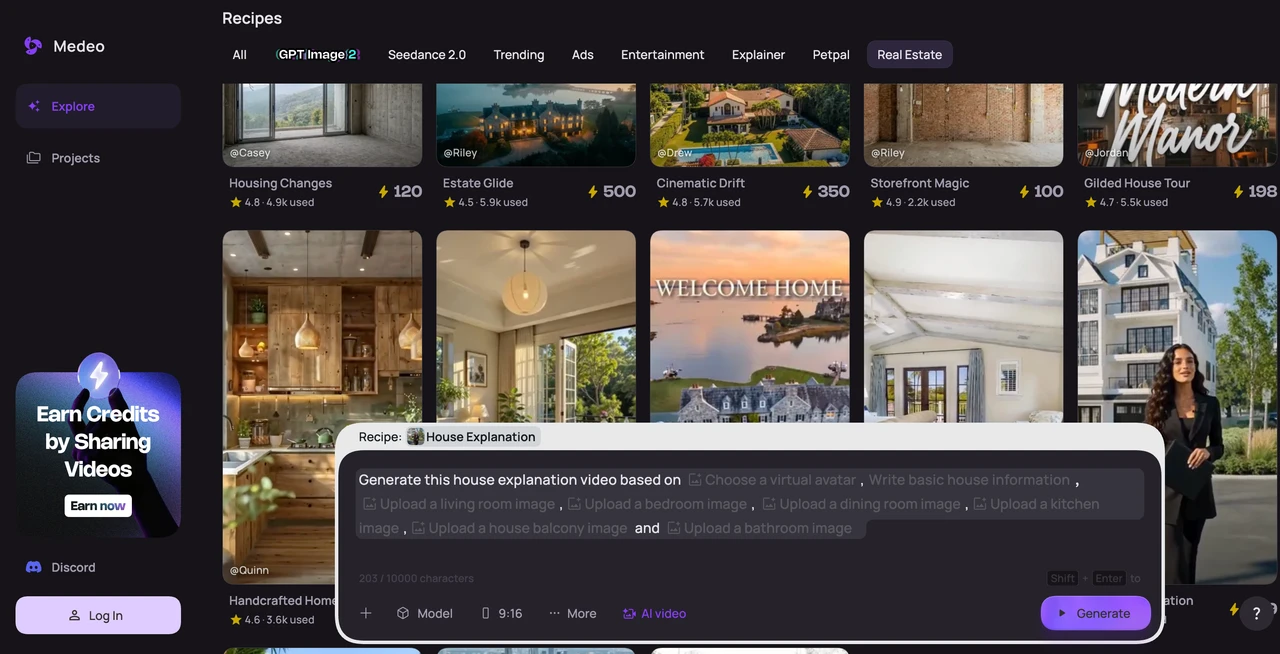
Step 2: Choose Your Video Format and Style
Once your content is ready, the next decision is presentation style. For real estate videos, the main options are:
Standard scene-based video with narration. The most versatile format. Works across listing platforms, landing pages, and email. Voice narration walks buyers through each section of the home without requiring them to read anything.
Photo-based home tour. If your input is images, this format adds motion and structure to what would otherwise be a slideshow. Buyers engage more when content feels like a video rather than a gallery.
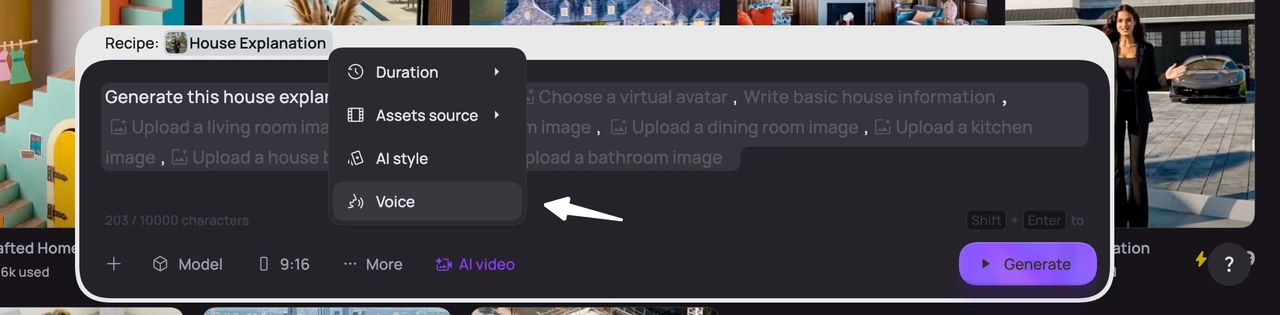
Avatar-led presentation. A virtual presenter introduces the property and neighborhood. This creates a consistent on-camera presence across your listings without requiring you to film yourself each time.
Short social cut. A condensed version designed for feed content. Typically, under 60 seconds, high visual contrast, and optimized for mobile viewing.
If you're regularly publishing content across platforms, it's worth thinking about how your video format will extend to social. The faceless video format is another approach worth exploring for agents who want to produce consistently without always being on camera themselves.
Step 3: Generate Your Video
This is where the actual production happens. For workflows built around listing content, the flow typically looks like this:
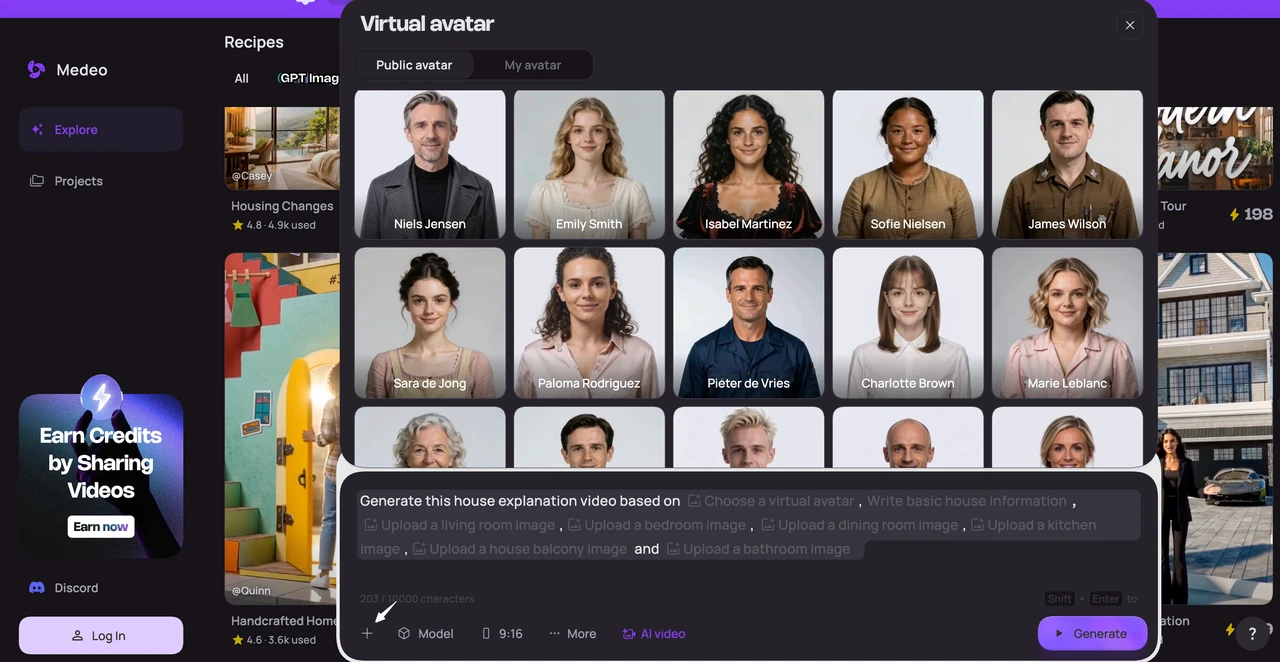
Input your listing details, photos, or script — paste text, upload images, or describe what you want in plain language.
Select your format — walkthrough, home tour from photos, social cut, or avatar-led.
Generate — scenes are structured, narration is added, and visuals are assembled with pacing.
For agents used to spending hours editing or briefing a production company, this is the step that changes everything. Most videos built from listing content are ready in minutes.
Step 4: Review and Refine
A first-pass video isn't always a finished video. Before publishing, go through it with a buyer's eye:
Does the narration accurately describe the home? If a detail has changed — square footage, price, availability — catch it here.
Does the pacing feel right? Some properties benefit from a slower, more atmospheric presentation. Others need to move quickly to hold attention.
Is the visual order logical? A good real estate video follows a natural flow — exterior first, then main living areas, then bedrooms, then outdoor spaces.
Would you watch this all the way through? That's the real test. If you'd skip ahead, buyers will too.
With Medeo's workflow, you can describe the changes you want in plain language and the video updates accordingly — no need to re-edit frame by frame.
Step 5: Add Voiceover
Narration makes a real estate video significantly easier for buyers to follow. Instead of reading text overlays while also trying to understand the layout of a home, they can just watch and listen.
If you don't want to record yourself, natural-sounding voice narration can be generated automatically based on your script or listing details. This is particularly useful for agents with large portfolios — recording audio for 20 listings a month quickly becomes a full-time job on its own.
A clean, clearly-spoken voiceover that highlights key selling points — the open-concept kitchen, the primary suite, the proximity to good schools — does more to move a buyer toward a showing than almost any other element.
Step 6: Export and Publish
Once you're satisfied with the video, it's time to get it in front of buyers. A few places worth considering:
Your listing page. Embed the video directly on the MLS listing or your own property landing page. Buyers who watch a listing video before a showing tend to arrive better informed and more serious.
Email to your buyer database. Short video content in emails consistently outperforms static images. Even a thumbnail with a play button drives more clicks than a photo.
Instagram and Facebook. Use the short social cut here. Stories, Reels, and Feed posts all work. The goal isn't to show everything — it's to make someone curious enough to ask for more.
YouTube. If you're building out a content library or working on search visibility, a dedicated YouTube channel for your listings and market updates compounds over time. For agents looking to systematize this, the YouTube content workflow is worth exploring.
Your agent profile. A library of well-produced listing videos builds credibility faster than any bio paragraph. Pair it with a personal brand video that introduces who you are and how you work.
Beyond Listings: Other Real Estate Videos Worth Making
Most agents start with listing videos, but the format goes further than property walkthroughs. Here are a few other types that tend to perform well.
Market update videos. Short, data-driven clips that explain what's happening in your local market. Buyers and sellers bookmark agents who put these out consistently, and once you have a template, producing it weekly takes very little time.
Neighborhood spotlights. Some buyers aren't just buying a home — they're buying into a neighborhood. A short video covering walkability, schools, local businesses, and community feel helps them make that broader decision.
Explainer videos for buyers and sellers. First-time buyers have a lot of questions. An explainer video that walks through the offer process, what to expect at closing, or how to prepare a home for sale positions you as the expert resource — before anyone has even called you.
Campaign and ad videos. Short, direct videos designed to run as paid ads on Facebook or Instagram. These need a strong hook in the first three seconds and a clear call to action at the end.
Common Mistakes to Avoid When Making Real Estate Videos
Starting without a clear goal. A listing video and a social media teaser are different products. Know which one you're making before you start.
Too much information too fast. Buyers can't absorb everything in a single viewing. Focus on the three or four things that make a property stand out — let the video create curiosity, not overwhelm.
Inconsistent presentation across listings. If some listings have polished video and others don't, it creates an uneven impression of your brand. A template-based workflow helps you stay consistent.
Skipping the audio review. Narration that's unclear, too fast, or out of sync with what's on screen breaks the experience. Always review the audio before publishing.
Forgetting a call to action. Every real estate video should end with something — a contact, a website, a prompt to book a showing. Don't let the video just stop.
FAQ: Real Estate Videos
How do you make a real estate video?
Start with what you already have — listing photos, a property description, or a short script. Structure that material into scenes with narration and visuals. Tools like Medeo handle the editing automatically, so you're not building a timeline from scratch. Review the output, refine what needs adjusting, then publish to your listing page, email list, or social channels.
How do you make a real estate video for social media?
Keep it short — under 60 seconds — and lead with the most visually compelling part of the property. Skip the full room-by-room tour and focus on two or three standout features instead. End with a direct prompt: "DM me for the full listing" or "link in bio." Vertical format works best for Instagram Reels and Stories; horizontal for Facebook feed.
Can I make a real estate video from photos?
Yes. You don't need video footage to produce a home tour video. Upload your listing photos and a tool like Medeo will build a structured video with motion, transitions, and narration — making the content feel more engaging than a standard photo gallery.
What should be included in a real estate listing video?
A strong listing video covers: exterior and curb appeal, main living areas, kitchen, primary bedroom and bath, any standout features (fireplace, view, outdoor space), and a clear call to action. Keep the total length between 60 seconds and 3 minutes depending on the property and platform.
How long should a real estate video be?
It depends on the format and platform. A full listing walkthrough can run 1–3 minutes on a property page. Social media cuts should stay under 60 seconds. Agent introduction videos typically run 60–90 seconds. The rule is simple: as short as the content allows while still answering the buyer's main questions.
Do real estate videos actually help sell homes?
Yes, and the numbers are clear. Listings with video consistently generate more inquiries than photo-only listings. Buyers who watch a listing video before a showing arrive better prepared and more serious. Agents who use video regularly also report stronger brand recognition in their markets — video has gone from a premium add-on to a baseline expectation for competitive listings.
What's the best real estate video maker for agents?
The best option for most agents is one that works from existing listing material — photos, descriptions, or a brief script — without requiring editing skills or production time. Tools that handle scripting, narration, and scene structure automatically let agents produce video for every listing, not just the high-value ones. That consistency is what builds a recognizable brand over time.
Can I make real estate videos without editing experience?
Yes. Modern real estate video tools are built for agents, not editors. You provide the listing details or photos, and the tool builds the structure, adds narration, and paces the content. You review and adjust in plain language rather than working with a timeline. No editing background needed.
Where should I post my real estate videos?
The highest-priority placements are: your listing page or MLS entry, your agent website, and your most active social channel (Instagram or Facebook for most agents). YouTube is worth building if you're thinking long-term about search visibility.
How long does it take to make a real estate video?
When working from listing photos or a description, most real estate videos can be produced in minutes — not hours. The review and refinement step adds some time, but even for a polished listing video ready to publish, the total process is typically well under 30 minutes.
Final Thoughts
Making a real estate video used to mean scheduling a shoot, hiring an editor, and waiting days for a final file. That's still one option — but it's no longer the only one, and for most listings, it's not the most practical one either.
The agents gaining ground right now are the ones producing video consistently: every listing, every market update, every piece of content that answers a buyer's question before they've asked it. Start with one listing. Use whatever you already have. For most agents, that first video is the one that changes how they think about marketing entirely.