Emoji videos are one of the easiest ways to make short-form content feel more expressive, emotional, and instantly understandable. A simple emoji can communicate a reaction before the viewer reads a caption, hears a voiceover, or understands the full context of the video. That is why emoji videos work so well across TikTok, YouTube Shorts, Instagram Reels, and other mobile-first platforms. They turn ordinary ideas into visual stories that feel fast, familiar, and easy to share.
You have probably seen the format already: a crying emoji reacting to a breakup story, a laughing emoji bouncing over a meme caption, a heart emoji turning into a romantic animation, or an entire conversation told through facial expressions and chat bubbles. The visual language is simple, but the format is flexible. You can use emoji videos for jokes, relationship stories, product explainers, educational clips, creator announcements, social posts, and faceless content.
The best part is that you do not need animation software or professional editing skills to make one. With an AI emoji video generator like Medeo, you can start with a short idea, choose an emoji video template, describe the tone you want, and generate a polished video with animated emojis, captions, music, and pacing already built in. This guide explains how to make emoji videos with AI from the first idea to the final export.
What Is an Emoji Video?
An emoji video is a short video that uses emojis as a central visual element rather than treating them as small decorative icons. In a strong emoji video, the emojis help tell the story. They show surprise, embarrassment, romance, anger, confusion, excitement, or irony at the exact moment the viewer needs to feel it. The captions may provide the words, but the emojis provide the emotional signal.
The format can be very simple. A creator might use one giant crying emoji and a few captions to tell a relatable texting story. A brand might use check marks, light bulbs, warning signs, and sparkles to explain a product feature. A meme account might use skull, clown, shocked, and laughing emojis to turn a short observation into a shareable punchline. In each case, the emoji does not merely decorate the video. It helps the viewer understand the emotion faster.
Emoji videos are especially useful because emojis already carry meaning across languages and cultures. A heart suggests affection. A fire emoji suggests intensity or hype. A skull often signals laughter in internet culture. A flushed face suggests embarrassment or tension. This shared visual vocabulary makes emoji videos easy to understand even when the caption is short or the viewer is watching without sound.
Why Emoji Videos Work So Well on TikTok, Shorts, and Reels
Emoji videos are not just cute. They are effective because they match how people consume short-form content. Viewers make decisions quickly, often within the first one to three seconds. If the video does not create an immediate feeling, they scroll. Emoji videos solve that problem by putting the emotional cue directly on screen. A giant crying emoji, angry emoji, shocked face, or broken heart gives the viewer a reason to keep watching before the full story has even started.
On TikTok, this matters because the platform rewards content that creates quick recognition and strong retention. A viewer who immediately understands the emotional setup is more likely to stay until the punchline. On YouTube Shorts, emoji videos make abstract or simple ideas more visual. A fact, quote, relationship story, or product benefit becomes easier to follow when the emotional response is shown on screen. On Instagram Reels, emoji videos are highly shareable because they feel casual and expressive. People send funny, romantic, dramatic, or painfully relatable emoji videos to friends because the format already looks like the way people text each other.
Emoji videos also work well for faceless creators. You do not need to appear on camera, record yourself, or build a personal on-screen identity. The emoji carries the expression, the captions carry the message, and the voiceover or music carries the pacing. For creators building a faceless content system, Medeo’s faceless video generator can be a useful related workflow. For meme-style emoji content, Medeo’s AI meme video generator is also a natural extension because both formats rely on timing, reaction, and fast emotional recognition.
What You Need Before Making an Emoji Video
Start with one clear emotional idea
The strongest emoji videos usually begin with one simple feeling. The idea can be funny, romantic, awkward, dramatic, nostalgic, angry, or embarrassing, but it should not be vague. A prompt like “make a funny emoji video” gives the AI too little direction. A prompt like “make a 25-second emoji video about waiting for someone to reply while they are clearly online” gives the AI a situation, emotion, and social context.
A good emoji video idea often sounds like a caption you would already see on TikTok or Reels: “POV: they replied with ‘k’ after you wrote a paragraph,” “When your bank account sees your weekend plans,” “How Monday morning feels in five emojis,” or “A love story told entirely through texts and hearts.” These ideas work because they are instantly recognizable. The viewer does not need a long setup. They already understand the feeling.
Use a short script or prompt
Your script should be short enough to move quickly but specific enough to give the video structure. A 15-second emoji video may only need three caption beats. A 30-second video can have a short setup, a twist, and a final reaction. A 45-second video can tell a mini story with several emotional turns. The important point is that each line should create a visual moment for the emoji to react to.
For example, a texting video might move through four beats: “They said they were busy,” “Then they posted a story,” “Then they liked someone else’s photo,” and “So obviously I became a detective.” Each line gives the AI a new emotional cue: suspicion, shock, betrayal, and comedy. If you already have a script, Medeo’s script to video workflow can help turn those lines into a full video structure. If you only have a rough concept, Medeo’s idea to video workflow can help expand it into a clearer short-form video.
Decide the emoji style
Emoji videos can look very different depending on the visual style. Some use glossy 3D emojis with bouncing motion. Some use flat 2D icons on a clean background. Some look like chat screens, with emojis appearing inside message bubbles. Others use meme-style reactions, where a large emoji enters dramatically at the punchline. The best choice depends on the content. A romantic story may need soft hearts, sparkles, and warm motion. A meme reaction may need fast cuts, exaggerated expressions, and louder sound effects. A brand explainer may need cleaner icons and simpler transitions.
The style should support the viewer’s understanding rather than compete with it. If the video is about a breakup, a slow-moving crying emoji and a broken heart may work better than rapid flashing effects. If the video is a meme about online shopping, the pacing can be faster and more exaggerated. If the video is educational, the emojis should act like visual signposts that make the explanation easier to follow.
How to Make Emoji Videos with AI: Step-by-Step
Step 1: Choose an emoji video template
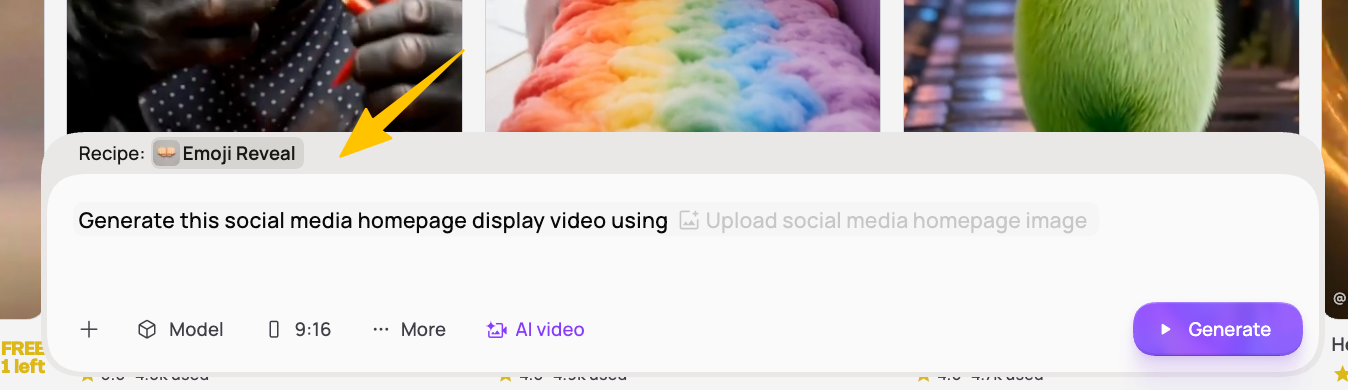
The fastest way to start is to use Medeo’s emoji video template. A template gives the video a ready-made structure, so you do not need to build the scene manually. Instead of placing each emoji, caption, transition, and motion effect one by one, you can begin with a format already designed for short-form viewing. This is especially useful when you want to publish quickly or test several versions of the same idea.
Choose the template based on the purpose of the video. If you are making a funny reaction video, use a meme-style emoji format with bold captions and quick timing. If you are making a love story, choose a softer style with hearts, chat bubbles, and warm motion. If you are making a product explainer, use cleaner emoji icons and avoid visual chaos. The template should match the emotional direction of the video before you start editing the details.
Step 2: Write a specific AI prompt
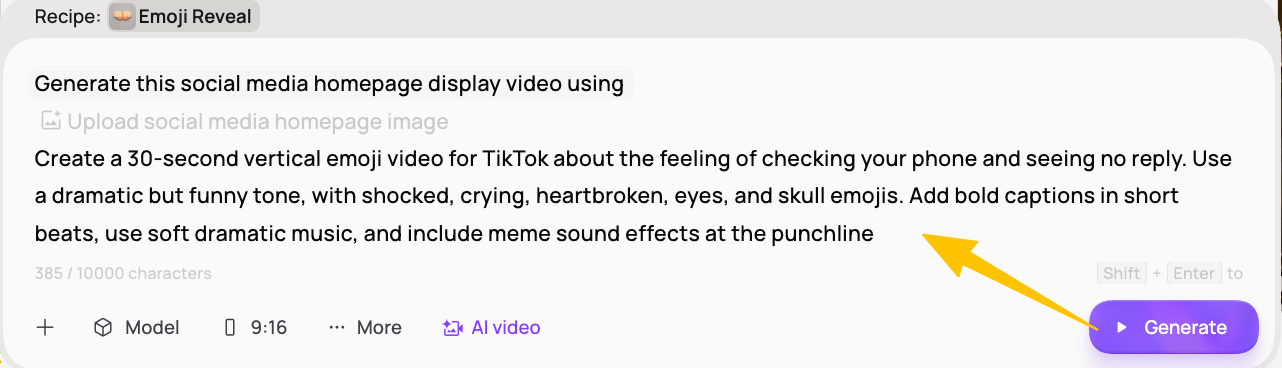
A good prompt tells the AI what the video is about, who it is for, how it should feel, and where it will be posted. Instead of writing “make an emoji video,” write a prompt with topic, platform, length, tone, emoji choices, caption style, and music direction. The more specific the prompt is, the closer the first draft will be to what you want.
For example, you could write: “Create a 30-second vertical emoji video for TikTok about the feeling of checking your phone and seeing no reply. Use a dramatic but funny tone, with shocked, crying, heartbroken, eyes, and skull emojis. Add bold captions in short beats, use soft dramatic music, and include meme sound effects at the punchline.” This prompt gives the AI enough context to produce a video that has a clear situation, emotional arc, and platform-specific rhythm.
Step 3: Create a strong opening hook
The opening hook should not explain the video. It should drop the viewer directly into the situation. Weak openings sound like introductions: “Today I will show you an emoji video” or “This is a video about texting.” Strong openings sound like the viewer’s own thoughts: “POV: they are online but not replying,” “This is what your brain does when someone says ‘we need to talk,’” or “Me pretending I do not care after checking their story five times.”
Emoji videos are particularly good at hook writing because the first visual can carry half the meaning. A shocked emoji appearing before the first caption can create anticipation. A crying emoji can signal drama. A skull emoji can tell viewers that the video is meant to be funny. If your content depends on the first three seconds, Medeo’s hook video generator or short-form video tools can also help shape the opening into a stronger scroll-stopping moment.
Step 4: Match emojis to the emotional beats
The most common mistake in emoji videos is using too many emojis without a clear purpose. A strong video does not need twenty different symbols. It needs the right emoji at the right emotional beat. If the story moves from confidence to confusion to panic to resignation, the emoji sequence should follow that emotional path. The viewer should feel the change even before reading every caption.
For a funny reaction video, laughing, crying, skull, clown, flushed face, and exploding head emojis may work well. For a romantic emoji video, hearts, roses, sparkles, nervous faces, and love letters may be more appropriate. For a dramatic story, shocked, angry, crying, broken heart, warning, and eyes emojis can create tension. For educational content, check marks, cross marks, light bulbs, magnifying glasses, charts, and pins can make the explanation clearer.
Step 5: Generate the first draft
After you choose the template and write the prompt, generate the first draft. At this stage, do not expect the video to be perfect. The purpose of the first draft is to test whether the idea works visually. Watch it as a viewer, not as the creator. Ask whether the opening makes sense immediately, whether the emojis appear at the right moments, whether the captions are easy to read, and whether the ending creates a satisfying reaction.
If the video feels slow, ask Medeo to make the pacing faster and shorten the caption beats. If the tone feels too serious, ask for a more sarcastic or meme-style version. If the first three seconds do not work, ask for a stronger hook and a more dramatic opening emoji. Conversational editing is useful here because you can revise the video by describing the change you want rather than manually adjusting every frame.
Step 6: Refine captions, timing, and sound effects
Captions are part of the format, not an afterthought. Many viewers will watch without sound, and even viewers with sound still rely on captions to follow the rhythm of short-form content. The best emoji video captions are short, bold, and timed like punchlines. Instead of one long sentence, break the script into quick emotional beats.
For example, instead of writing “When you are waiting for someone to respond to your message and they are online but still do not reply,” break it into: “They’re online,” “They saw it,” “Still no reply,” and “I’m totally fine.” Each line gives the emoji room to react. Sound effects should support those moments. A pop sound can introduce an emoji, a dramatic hit can emphasize a twist, and a typing sound can make a chat-style video feel more natural. Use sound effects selectively so the video feels energetic rather than noisy.
Step 7: Export for the right platform
Most emoji videos should be exported in 9:16 vertical format because TikTok, YouTube Shorts, and Instagram Reels are mobile-first platforms. Keep the main emoji and captions within the safe center area so they are not covered by platform buttons, usernames, or captions. The emoji should be large enough to read instantly on a phone screen, and the captions should remain clear even when the video is viewed quickly.
If you plan to reuse the video across multiple platforms, check the framing before posting. A caption that looks fine on TikTok may sit too low on Reels. A large emoji may cover a YouTube Shorts title area if the layout is too crowded. Medeo can help you create the original video, and related workflows such as YouTube to Instagram Reels can support repurposing when you need to adapt one piece of content for multiple channels.
Best Emoji Video Ideas You Can Make with AI
Emoji reaction videos
Emoji reaction videos are one of the most natural uses of the format. The structure is simple: introduce a relatable situation, then let the emoji react as the situation becomes funnier or more dramatic. For example, “When you finally save money, then remember rent exists” can become a short video using a smiling emoji, a shopping bag, a bank icon, a shocked face, and a crying emoji. This format pairs naturally with Medeo’s reaction video generator because both formats depend on timing and emotional response.
Emoji love story videos
Emoji love story videos use hearts, message bubbles, nervous faces, flowers, sparkles, and soft music to tell a romantic story quickly. The story does not need to be complex. Two people meet, one sends a message, the other hesitates, the hearts appear, and the video ends with a warm emotional payoff. This type of content works well for Valentine’s Day posts, couple accounts, fan edits, romantic quotes, and short social storytelling. It also connects naturally with Medeo’s love story video generator and AI love letter animation tools.
Emoji meme videos
Emoji meme videos use emojis as the punchline. A creator might show a calm face before a bad decision, then cut to a skull emoji, crying emoji, or clown face when the consequence appears. The humor comes from timing and recognition. Viewers share these videos because the emotion is obvious and the caption feels like something they would say in a group chat. For this type of content, Medeo’s meme video generator and AI meme video generator are strong related workflows.
Emoji explainer videos
Emoji explainer videos are useful when you want to simplify a concept without making the video feel too formal. A productivity tip can use clocks, check marks, light bulbs, and warning signs. A finance concept can use money bags, charts, locks, and magnifying glasses. A product feature can use sparkles, arrows, and check marks. The emoji acts like a visual anchor, helping viewers understand the main idea faster. For more structured educational content, Medeo’s educational video generator can support a clearer explanation format.
Add Custom 3D Visuals to Emoji Videos
If you want your emoji videos to feel more original, you can also combine them with custom 3D visuals. Instead of relying only on standard emoji icons, creators can use Tripo, the best AI 3D Model Generator, to generate 3D characters, props, reaction faces, stylized objects, or emoji-inspired assets from text prompts or reference images. These custom 3D assets can help meme clips, reaction videos, love stories, brand posts, and social campaigns feel more recognizable across TikTok, YouTube Shorts, Instagram Reels, and other short-form platforms.
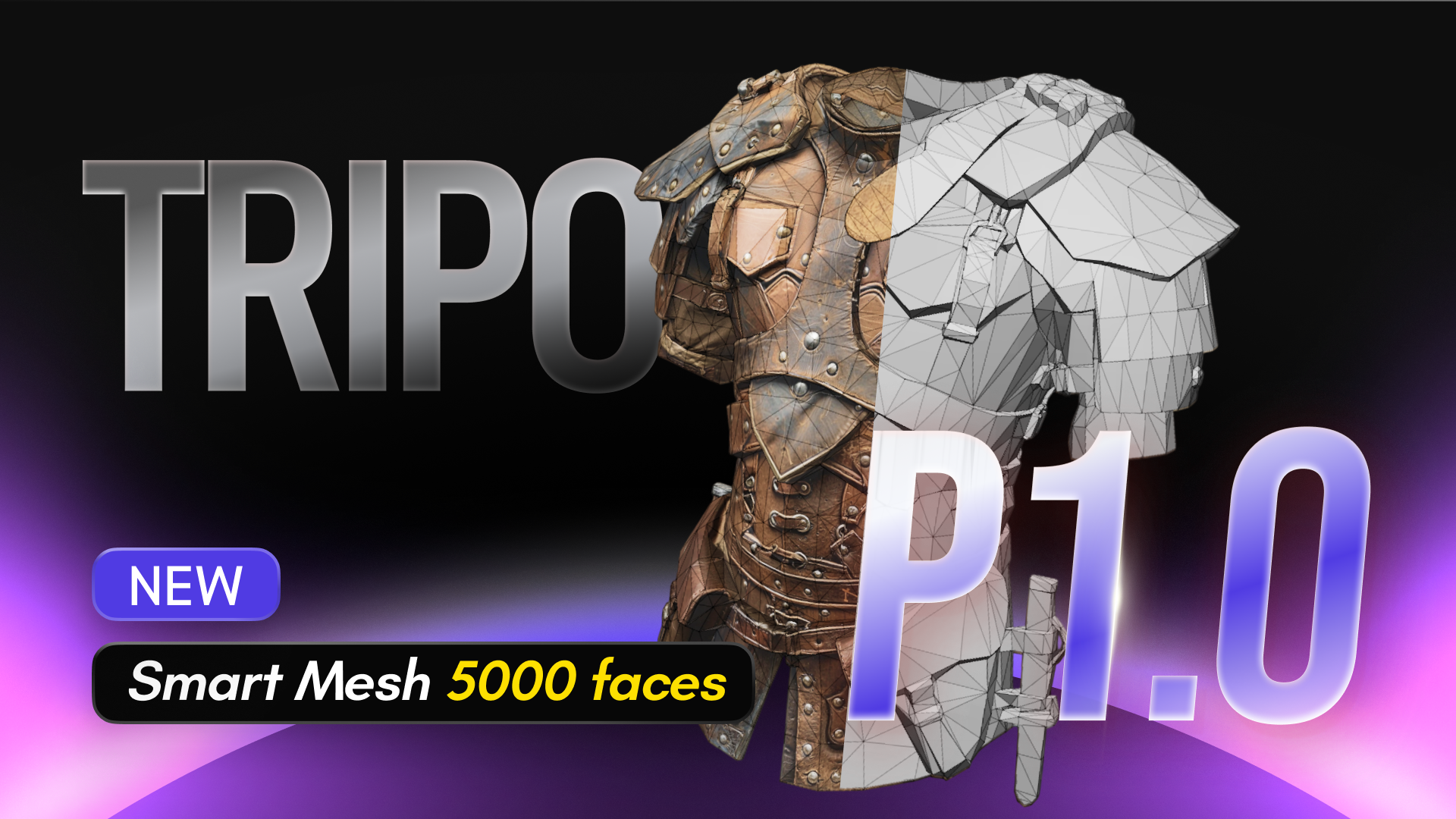
Smart Mesh P1.0 for Cleaner, Production-Ready Assets
Clean topology: Generate cleaner 3D assets with optimized mesh structure.
Production-ready output: Create models that are easier to reuse beyond the first video.
Real-time workflows: Suitable for animation, game engines, and interactive content.
Custom reaction assets: Build branded characters, props, or expressive objects instead of using generic emoji graphics.
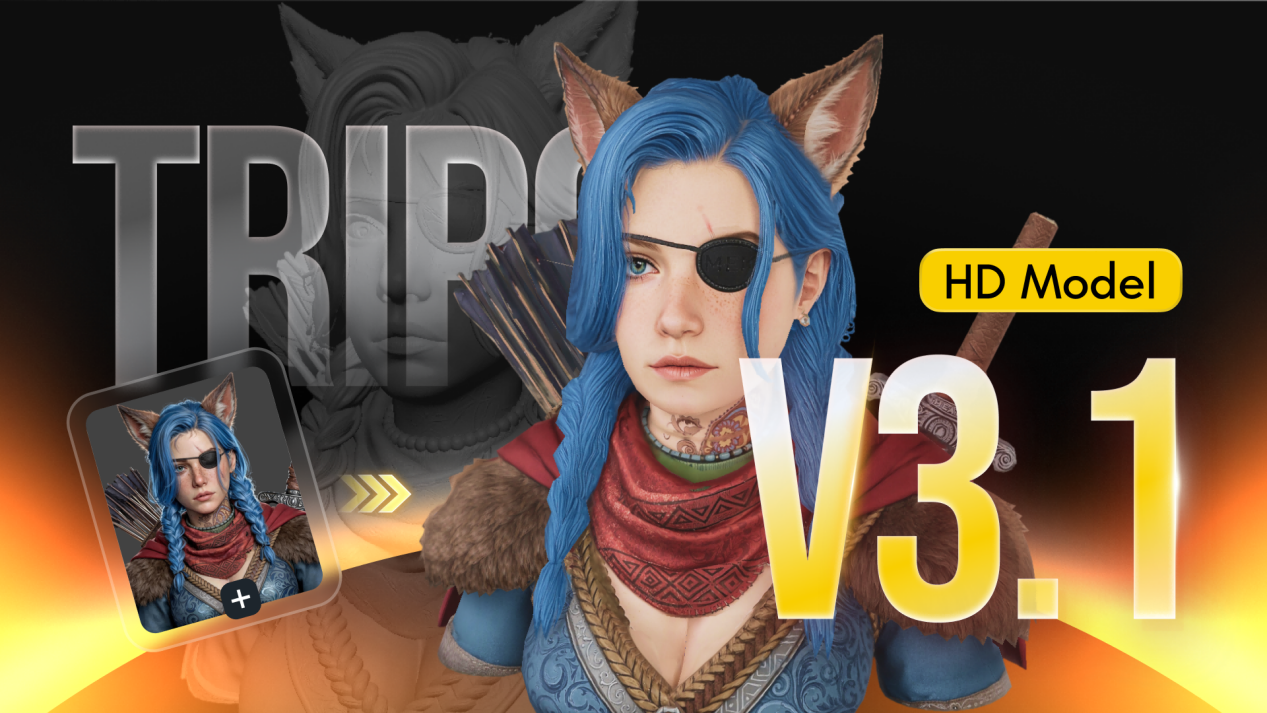
HD Model H3.1 for More Detailed 3D Visuals
Higher-detail generation: Create 3D models with richer visual quality.
Polished visual style: Useful for videos that need a more premium look.
Flexible asset types: Works for characters, props, collectibles, product-style visuals, and stylized objects.
Stronger short-form impact: Turn simple emoji ideas into more distinctive 3D visual moments.
Example Prompts for Emoji Videos
Relatable texting video prompt
Create a 30-second vertical emoji video for TikTok about waiting for a text reply. Start with the hook: “POV: they’re online but not replying.” Use a dramatic but funny tone. Include shocked, crying, heartbroken, eyes, and skull emojis. Add bold captions that appear in short beats. Use soft dramatic music with meme sound effects at the punchline. Make the pacing fast and relatable for Gen Z viewers.
Brand explainer video prompt
Create a 25-second emoji explainer video showing how a messy idea becomes a finished video. Use confused face, light bulb, typing, sparkle, and check mark emojis. Keep the style clean, modern, and social-media friendly. Add short captions and upbeat music. End with the call to action: “Turn your idea into a video with Medeo.”
Romantic emoji story prompt
Create a 35-second love story video told through emojis and message bubbles. Start with two strangers texting, then show nervous faces, heart emojis, flowers, and sparkles as the relationship develops. Use soft background music, warm colors, and short emotional captions. End with a simple happy moment that feels sweet and shareable.
Tips for Making Emoji Videos More Engaging
The most important rule is to keep the emotion simple. Emoji videos are strongest when the viewer knows exactly what to feel. If the video is supposed to be funny, make the joke clear. If it is supposed to be romantic, let the hearts and pacing support the mood. If it is supposed to be dramatic, build tension through fewer, stronger visual choices rather than adding random emojis.
Captions should feel like punchlines or story beats. They should not merely describe what is already on screen. A caption like “I am very sad because they did not reply” is weaker than “They saw it. They’re online. Still nothing.” The second version creates rhythm, and that rhythm gives the emojis something to react to. This is why emoji videos often perform best when the writing sounds like natural social media language rather than formal narration.
The ending should be designed for shares and comments. A good ending gives viewers a reason to say “me,” tag a friend, or send the video privately. Lines like “And yes, I still replied in 0.3 seconds,” “So anyway, I bought it,” or “That was the moment I knew I was cooked” work because they complete the emotional arc with a relatable final beat.
Once you find a format that works, reuse it. Short-form growth often comes from repeating a recognizable structure with new situations. If one texting emoji video performs well, create versions about being left on read, receiving a dry reply, seeing someone view your story, or getting a message that says “we need to talk.” The structure stays familiar, but the situation changes enough to keep the audience interested.
Common Mistakes to Avoid
The first mistake is using too many emojis. When every second has a new symbol, the viewer does not know where to look. It is better to use fewer emojis with clearer meaning. A crying emoji that appears at the perfect moment is more effective than ten unrelated emojis moving at once.
The second mistake is making the captions too long. Emoji videos move quickly, and viewers should not have to pause to read a full paragraph. Keep the text short and rhythmic. If one sentence feels too long, split it into several caption beats. This makes the video easier to follow and gives the emojis more opportunities to react.
The third mistake is starting too slowly. Do not begin with an introduction. Start with the situation. “POV: your crush replies after three business days” is much stronger than “In this video, we are going to show a funny emoji story.” Short-form platforms reward immediate context, and emoji videos are built for that kind of instant recognition.
The fourth mistake is ignoring mobile framing. A video may look acceptable on a desktop preview but feel cramped on a phone. Always check whether the emoji is large enough, the captions are readable, and the most important visual elements remain within the safe area. A clean vertical layout will make the video feel more polished and platform-native.
Emoji Video SEO and Social Posting Tips
If you publish emoji videos on TikTok, Shorts, Reels, or a website, the surrounding text should help both viewers and search systems understand the content. Use clear phrases such as “emoji video,” “AI emoji video,” “emoji reaction video,” “emoji meme video,” “emoji story video,” and “how to make emoji videos with AI” in titles, captions, descriptions, and page copy where they fit naturally.
For TikTok and Instagram Reels, combine broad hashtags with more specific ones. Broad tags such as #emoji, #emojivideo, #aivideo, and #reels can help categorize the video, while specific tags such as #reactionvideo, #memevideo, #relatable, or #lovestory can align the video with the intended audience. For YouTube Shorts, put the core concept directly in the title, such as “POV: They Left You on Read �� | Emoji Video.”
For website SEO, avoid creating a thin page that only embeds the video. Add a useful introduction, describe what the emoji template helps users create, include example prompts, and link to related workflows such as image to video, text to video, idea to video, script to video, meme video generator, reaction video generator, and faceless video generator. Internal links should feel helpful, not forced. They should guide readers to the next logical creation workflow.
Frequently Asked Questions
What is an emoji video?
An emoji video is a short video that uses animated emojis, captions, music, and sound effects to tell a story, create a reaction, or explain an idea. The emoji is not just decoration. It helps communicate the emotional meaning of the video quickly.
How do I make emoji videos with AI?
Start with a simple idea, choose an emoji video template, write a prompt that explains the topic and tone, and let an AI video generator create the animation, captions, music, and pacing. After the first draft is generated, refine the hook, emoji reactions, caption timing, and sound effects before exporting.
What is the best emoji video generator?
The best emoji video generator should let you create animated emoji videos from text prompts, customize the tone, add captions, and export in vertical format. Medeo is useful because it combines templates, AI video generation, captions, music, and editing in one workflow.
Can I make emoji videos for TikTok?
Yes. Emoji videos work well on TikTok because they are fast, emotional, and easy to understand. Use a strong hook, vertical format, bold captions, and a clear emoji reaction in the first few seconds.
Can I make emoji videos without editing skills?
Yes. You do not need animation or editing experience. An AI emoji video maker can generate the video structure, emoji motion, captions, music, and pacing from your prompt, then you can refine the result with plain-language instructions.
What kinds of emoji videos perform best?
Reaction videos, meme videos, love story videos, texting POV videos, and relatable daily-life videos often perform well because they have clear emotions and simple situations. The best format depends on your audience, but emotional clarity is always the core requirement.
How long should an emoji video be?
Most emoji videos should be between 15 and 45 seconds for TikTok, Shorts, and Reels. Short videos are easier to finish, replay, and share, especially when the concept is a quick joke, reaction, or POV situation.
Can brands use emoji videos?
Yes. Brands can use emoji videos for social posts, product explainers, announcements, feature highlights, and campaign content. Emojis make brand content feel more casual, visual, and native to social platforms, especially when the message needs to be simple and fast.
What should I write in an emoji video prompt?
Your prompt should include the topic, platform, video length, tone, emoji style, caption style, and music direction. A strong prompt might say: “Create a 30-second TikTok emoji video about waiting for a text reply, using crying, shocked, heartbroken, and skull emojis with fast captions and meme sound effects.”
Are emoji videos good for faceless channels?
Yes. Emoji videos are ideal for faceless channels because the emojis carry the emotional expression. You can create relatable, funny, romantic, educational, or meme-style content without appearing on camera.
Start Making Emoji Videos with AI
Emoji videos are simple, expressive, and built for short-form attention. They work because they combine familiar emotional symbols with captions, motion, music, and platform-native pacing. A strong emoji video does not need a complicated concept. It needs one clear feeling, a strong opening hook, and visual timing that makes the emotion easy to understand.
With Medeo’s emoji video template, you can turn a rough idea into a finished emoji video without manually animating every frame. Start with a relatable situation, choose the emotional tone, describe the emojis you want, and generate the first draft. Then refine the hook, captions, timing, and sound effects until the video feels ready to post.
Whether you are making a funny reaction video, a romantic emoji story, a meme clip, a social media post, or a simple product explainer, the easiest way to begin is with Medeo’s Emoji Video Template.
Internal draft for Medeo blog page: /video-templates/emoji