Most successful YouTube channels are built on one of two things: a recognizable personality, or a reliable system. YouTube automation is the second approach.
Instead of filming yourself on camera, recording voiceovers, and editing timelines frame by frame, you build a production workflow — using AI to handle scripting, visuals, narration, captions, and publishing — and run the channel as a content operation rather than a personal brand.
The model works. Channels like WatchMojo (100M+ subscribers), Kurzgesagt (24M), and Natural Lens (nearly 1M subscribers in a single year) have all built massive audiences without a face on camera. AI has made this approach faster, cheaper, and more accessible than ever.
This guide covers everything: what YouTube automation actually is, which niches pay the most, the step-by-step workflow for starting a channel, and how to use AI to run the entire operation without a production team.
What Is YouTube Automation?
YouTube automation is the process of running a YouTube channel where most or all of the production tasks — scripting, voiceover, video creation, editing, and publishing — are handled by AI tools, freelancers, or automated systems rather than the creator personally.
The result is a channel that produces content consistently and generates ad revenue, without the creator appearing on camera or doing manual video editing.
A YouTube automation workflow typically looks like:
Research — identify high-demand topics in your niche using keyword tools
Script — write (or AI-generate) a structured script for each video
Produce — generate visuals, voiceover, captions, and music using AI
Publish — upload with optimized titles, descriptions, and thumbnails
Monetize — earn through AdSense, affiliate links, and sponsorships as the channel grows
The creator's role shifts from "person who makes videos" to "operator of a video production system."
Why 2026 Is the Best Time to Start a YouTube Automation Channel
The combination of platform dynamics and AI capability makes 2026 an unusually good moment to build an automated channel.
YouTube Shorts changed the discovery math. YouTube now surfaces Shorts aggressively to new audiences — both on YouTube itself and in Google search results. A faceless automated channel that posts both long-form videos and corresponding Shorts gets two discovery pathways from a single piece of content. Channels that batch-produce 5–10 Shorts per week alongside their main uploads are seeing dramatically faster subscriber growth than those posting long-form only.
Cross-platform distribution multiplies reach without extra work. Content made for YouTube also works on Instagram Reels and TikTok with minimal adaptation. A 60-second vertical cut of your YouTube video can be posted to TikTok, Instagram Reels, and YouTube Shorts simultaneously — three audiences reached from one production. Medeo's viral short generator and scroll-stopping video tool are built specifically to create this kind of cross-platform content from the same source material.
TikTok and Instagram Reels traffic feeds back to YouTube. When short-form clips perform well on TikTok or Reels, viewers search for the full-length version on YouTube. Creators who post companion long-form content consistently see subscriber spikes driven by TikTok and Instagram discovery. This means a YouTube automation channel in 2026 isn't just a YouTube play — it's a multi-platform content operation where each platform drives growth on the others.
AI quality has crossed the "good enough to monetize" threshold. Two years ago, AI-generated video quality was visibly lower than human-produced content. That gap has closed significantly. AI tools now produce visuals, voiceovers, and editing that are indistinguishable from mid-tier human production — and often faster than any human workflow.
Best YouTube Automation Niches in 2026
Niche selection is the most important early decision. The best YouTube automation niches combine high search demand, reasonable competition, and strong CPM rates.
Finance & Investing ($15–$45 CPM) Budgeting, compound interest, stock market basics, cryptocurrency explainers. Advertiser demand is consistently high. Content is evergreen — a video explaining index fund investing published today will still get views in three years.
AI & Technology ($8–$20 CPM) AI tool reviews, software tutorials, tech news explainers. This niche moves fast, which means constant new content opportunities. Channels covering AI developments have seen explosive growth as audience interest has surged.
History & Documentary ($5–$12 CPM) Narrated historical events, case studies, biographical storytelling. Fully faceless by nature. Medeo's history storytelling generator and documentary-style tool are purpose-built for this format.
Self-Improvement & Motivation ($6–$15 CPM) Book summaries, productivity methods, mindset content. Book summary channels like Escaping Ordinary have generated 19M+ views on single videos. Evergreen topics and consistent structure make this ideal for automation.
Educational Explainers ($5–$12 CPM) Science, history, economics explained in accessible formats. The Kurzgesagt model — complex ideas made visually engaging — works at multiple production scales. See Medeo's explainer video guide for how this format works end-to-end.
Lofi / Study / Ambient ($10–$17 CPM) Background music, study streams, relaxation content. Extremely low production cost, very long watch times. Lofi Girl is a 13M+ subscriber channel built on this format. Medeo's lofi study video generator and locked-in study tool make this category easy to produce at volume.
True Crime & Mystery ($4–$10 CPM) Unsolved cases, documentary narrations, psychological case studies. Massive existing audience. Pure narration format — no filming required.
Storytime / Reddit Stories ($4–$8 CPM) AITA stories, relationship drama, workplace conflict narrated over visuals. One of the most durable automation formats because the content supply is essentially infinite. Medeo's storytime video generator handles this format specifically.
Practical rule: Can you outline 50+ video titles in this niche in under 20 minutes? If not, it's too narrow for a sustainable automation channel.
How to Start a YouTube Automation Channel: Step-by-Step
Step 1: Choose Your Niche
The niche decision shapes everything that comes after — your content calendar, your production workflow, and how long it takes to monetize. Pick based on three criteria in order: audience demand, CPM potential, and your existing knowledge.
Existing knowledge matters even in automation. If you understand personal finance, you'll spot gaps in existing coverage, write better briefs for your AI tool, and identify which angles will outperform generic explainers. You don't need to be an expert — you need enough familiarity to direct the content well.
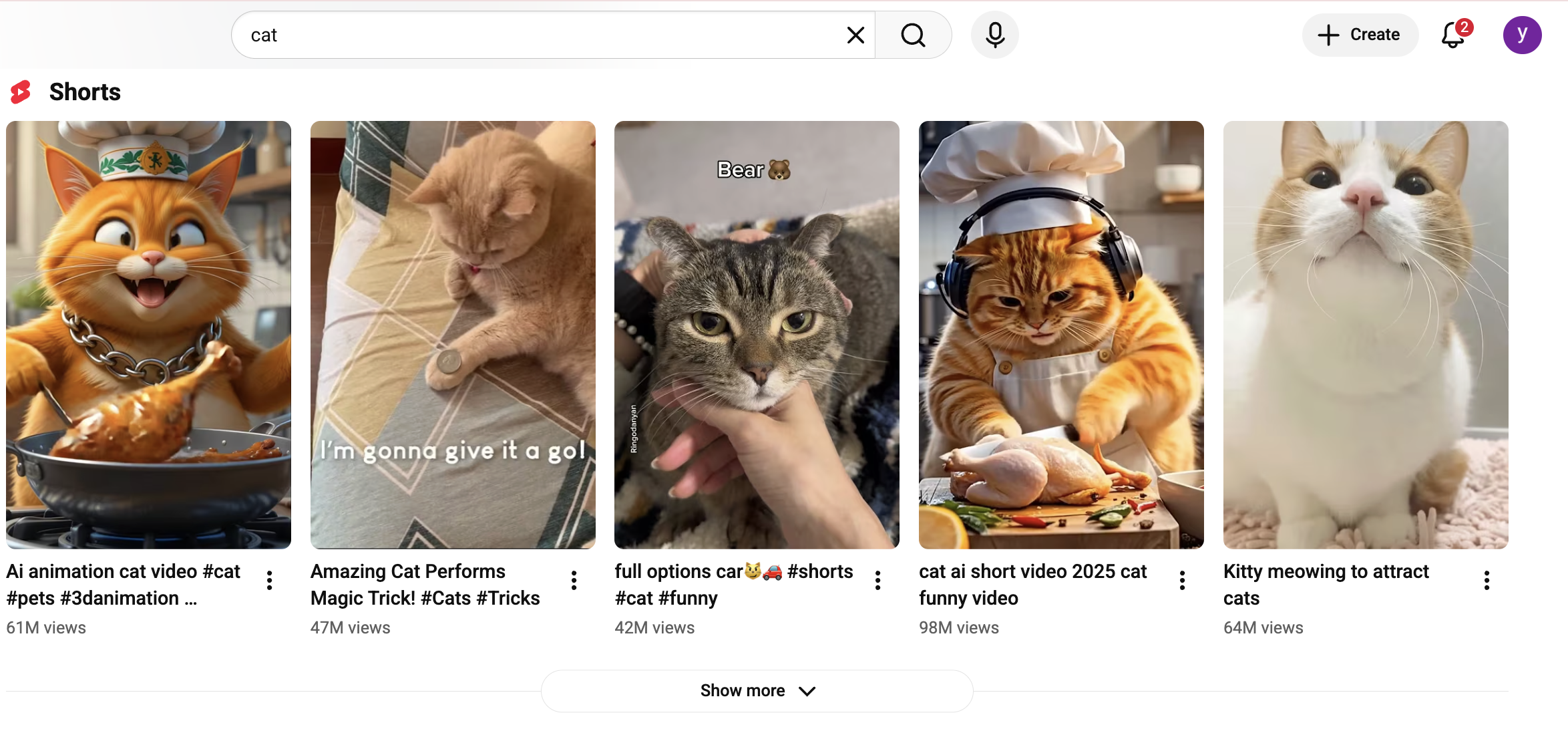
To validate demand before committing, search your potential niche keywords on YouTube and look at the top 10 results. If they're pulling 100K+ views and the competition isn't dominated entirely by major media brands, the niche has room. Tools like VidIQ and TubeBuddy make this research faster.
Step 2: Set Up Your Channel
A few decisions here that are easy to get wrong and hard to undo later.
Channel name. Topical, not personal. "Finance Unlocked" not "John's Money Tips." A topical name lets the channel outlast any single creator identity and is easier for the algorithm to categorize.
About section. Write it for search, not for humans. Include your primary niche keywords naturally: "This channel covers [niche topics] every week, including [specific content types]." This is one of the few places YouTube reads text directly for classification.
Playlists. Set up 3–5 subtopic playlists from day one. This increases session time — viewers who finish one video get pulled into the next — and helps YouTube understand what your channel is about before you have much watch history to go on.
Step 3: Research Topics and Build a Content Calendar
Don't start producing until you have 20–30 video ideas queued. Running out of topics mid-channel is the most common reason automation channels stall — and it usually happens around video 15.
A research process that works:
Search your niche on YouTube and sort by "Most popular" — these are proven topics with known demand
Look for videos with strong view counts relative to the channel size — that ratio indicates algorithm amplification, not just an old video with years to accumulate views
Read the comments on top videos — the questions viewers wish had been answered are your next video ideas
Use VidIQ keyword research to find high-volume, lower-competition search terms adjacent to your main topic
Build a calendar with at least one video per week. Two to three per week in the early phase accelerates growth significantly, when YouTube is actively assessing your upload consistency.
Step 4: Build Your AI Production Workflow
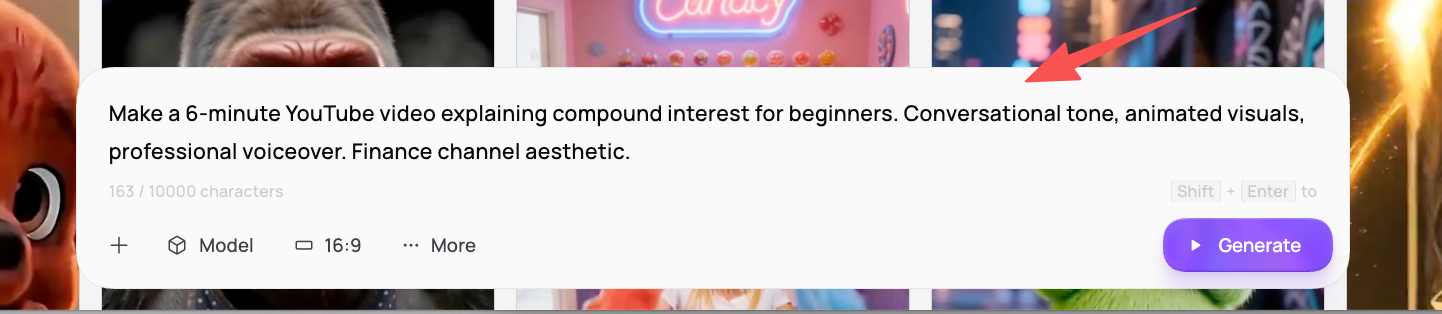
For a fully automated YouTube channel, you need five things handled consistently: script, visuals, voiceover, captions, and music. Medeo handles all five from a single conversational interface — describe your video, review the draft, give feedback in plain language, and export.
The workflow in practice looks like this: describe your video — "Make a 6-minute YouTube video explaining compound interest for beginners. Conversational tone, animated visuals, professional voiceover. Finance channel aesthetic." — and Medeo generates a complete draft. You watch it, say what's off — "The intro is too slow," "Make the third section more visual" — and the AI refines without you touching a timeline. Total production time per video: 30–60 minutes.
For channels that want to repurpose existing written content, blog to video converts articles into YouTube-ready video automatically. For longer or more structured content, the AI storyboard generator lets you map the visual structure before generating the full video.
Step 5: Create Your First Batch Before Launch
Don't publish on day one. Create 5–10 videos before the channel goes live. This does three things: it gives the algorithm enough content to understand what your channel is about immediately at launch, it lets you spot what's working before you've built an audience that expects consistency, and it creates a buffer so you're never scrambling to hit a publish date.
Batch production is also significantly more efficient than making one video at a time. Generate five scripts in one session, produce all five in Medeo, review them as a group — inconsistencies are much easier to catch across a batch than in isolation — then create thumbnails and schedule at 2–3 day intervals for launch week.
Step 6: Optimize for YouTube and Cross-Platform Distribution
Thumbnail. Click-through rate is one of the strongest signals in YouTube's distribution algorithm — and on a faceless channel, thumbnails do all the work that a recognizable face would otherwise do. Study the top 5 thumbnails in your niche. There are usually 2–3 dominant visual patterns. Match the format convention, then add one element that makes yours distinct.
Title. Include your primary keyword naturally and keep it under 60 characters. For evergreen niches, a direct informational format — "How Compound Interest Works" — outperforms clickbait because it matches search intent precisely rather than trying to game curiosity.
Shorts and cross-platform. Cut a 30–60 second vertical version of each video and post it as a YouTube Short. Use Medeo's auto clip generator to extract clips automatically. Post the same Short to TikTok and Instagram Reels — TikTok's For You Page and Instagram's Reels feed surface content to non-followers regardless of account size, and viewers who find you there will search for your YouTube channel directly.
Step 7: Monetize
YouTube Partner Program. The threshold is 1,000 subscribers and 4,000 watch hours (or 10 million Shorts views in 90 days). Most channels in quality niches with consistent 2–3 videos per week reach this in 3–6 months.
Affiliate marketing. Add affiliate links in video descriptions for products relevant to your content. Finance channels promoting brokerage platforms, tech channels promoting software tools — affiliate revenue at smaller subscriber counts frequently exceeds AdSense income.
Sponsorships. A niche-relevant channel with 5,000–10,000 engaged subscribers is already valuable to relevant brands. Don't wait for a large audience before reaching out — direct outreach at this stage is far more effective than waiting to be discovered.
Digital products. Educational automation channels naturally sell courses, templates, and guides. The audience built through automation content is already predisposed to buy related products in the same niche.
Frequently Asked Questions
What is YouTube automation?
YouTube automation is running a YouTube channel where production — scripting, visuals, voiceover, editing — is handled by AI tools or freelancers rather than done manually by the creator. The result is a channel that publishes consistently and grows without the creator appearing on camera or spending hours editing each video.
Is YouTube automation allowed by YouTube?
Yes. YouTube allows AI-assisted content creation as long as content is original and provides genuine value to viewers. Using AI for scripts, voiceovers, and visuals is permitted. Re-uploading other creators' content, inflating metrics artificially, or mass-producing repetitive low-quality content is not allowed.
What are the best YouTube automation niches in 2026?
The highest-earning niches by CPM are finance and investing ($15–$45), AI and technology ($8–$20), and lofi/ambient content ($10–$17). History/documentary, self-improvement, and educational explainers earn $5–$15 CPM and are well-suited to full AI production. The best niche combines strong CPM with an area where you can generate 50+ video ideas without running dry.
How to make YouTube automation videos with AI?
Use a tool like Medeo that handles the full production pipeline — script, visuals, voiceover, captions, and music — from a plain-language description. Describe your video, review the AI draft, give feedback, and export. Total production time per video: 30–60 minutes with no editing skills required.
What is the best AI tool for YouTube automation?
For full-pipeline video production across any content type, Medeo's conversational interface generates complete videos without requiring separate tools for scripting, voiceover, and editing. For high-volume faceless videos using stock footage, InVideo AI is a strong option. For avatar-based presenter content, HeyGen leads the category.
How long does it take to monetize a YouTube automation channel?
Most channels in quality niches with consistent 2–3 videos per week reach the YouTube Partner Program threshold (1,000 subscribers, 4,000 watch hours) in 3–6 months. The biggest accelerator is niche selection — high-search-demand, lower-competition niches with evergreen topics grow faster than trend-dependent content.
How many videos before a YouTube automation channel makes money?
Most channels reach 1,000 subscribers in the 50–100 video range when publishing consistently. Some high-demand niches see monetization at 30–40 strong videos. One video that captures algorithm interest can accelerate the whole channel. Quality of individual videos matters as much as volume.
What is the difference between YouTube automation and a faceless YouTube channel?
A faceless channel means no creator appears on camera. YouTube automation refers to using AI or outsourcing for production. You can have a faceless channel where the creator still manually scripts and edits everything — faceless but not automated. YouTube automation channels use systems (AI tools, freelancers, or both) to handle production with minimal manual effort from the creator.
Can I start a YouTube automation channel with no money?
Yes. YouTube is free to publish on. Medeo and several other AI video tools offer free plans. The main investment is time — researching niches, reviewing content, and building thumbnails. As the channel monetizes, revenue can fund better tools and higher production volume.
What are good YouTube automation channel ideas?
Strong formats for automation include: history documentaries, true crime narrations, book summaries, finance explainers, AI and tech tutorials, self-improvement content, storytime/Reddit story channels, lofi study streams, and educational explainer series. The best format for your channel depends on your niche — pick one where the supply of topics is effectively unlimited.
Start Your YouTube Automation Channel
The fastest path is to start with one niche, one format, and five videos. Don't optimize thumbnails before you've made anything. Don't research monetization strategies before you've published. Make the first five videos, publish them, and let the algorithm tell you what's working.
Describe your first video to Medeo, generate the draft, and refine it until it would hold the attention of someone who's never seen your channel. Clear that bar once, and you'll know how to clear it faster every week after.