If people don't understand your product in the first 30 seconds, they leave.
Explainer videos fix that. A well-made explainer takes a complex idea, product, or process and turns it into something a viewer grasps immediately — without reading a paragraph of copy or sitting through a sales call.
The problem used to be production. Writing a script, hiring a voiceover artist, sourcing visuals, editing — even a two-minute explainer could take days and cost thousands. AI has changed that math entirely. Today you can go from a concept to a publish-ready explainer video in under an hour, without editing software, a studio, or any technical skills.
This guide covers everything: what an explainer video is, which format to choose, and a step-by-step process for making one with AI that's actually worth watching.
What Is an Explainer Video?
An explainer video is a short video — typically 60 to 120 seconds — that explains a product, service, concept, or process in a simple, engaging way. The goal is always the same: help your viewer understand something quickly so they can decide what to do next.
Explainer videos are used across the entire customer journey:
Homepage and landing pages — introduce what you do to first-time visitors
Product pages — show how a specific feature works
Onboarding flows — walk new users through getting started
Sales decks — replace the 10-slide deck with a two-minute video
Social media — build awareness with shareable content
Internal training — document processes for teams
A good explainer video follows a simple structure: identify the problem your audience has → introduce your solution → show how it works → tell them what to do next. That's it. Complexity is the enemy of a good explainer.
Types of Explainer Videos
The format you choose affects everything from production time to how well it lands with your audience.
Animated explainer videos The most common format. Motion graphics, characters, and visual metaphors make abstract concepts concrete. Works especially well for software products, SaaS tools, and anything that's hard to film. High-quality animated explainers used to require a professional studio — AI has made this format accessible to anyone.
Talking head / AI avatar video A presenter (real or AI-generated) speaks directly to the camera, walking through the explanation. Builds trust and personality. Works well for product introductions, onboarding videos, and company announcements. AI avatar tools like HeyGen make this format easy to scale without filming.
Screencast / product walkthrough Record your screen and narrate as you demonstrate the product. The most direct way to show how software works. Best for tutorials, feature explanations, and technical documentation.
Whiteboard / doodle video Drawings appear on screen as a voiceover explains the concept. Creates a sense of discovery that's effective for educational content and process explanations.
Live-action Real people, filmed on camera. The most human format — best for emotional storytelling, brand films, and customer testimonials. Requires the most production effort.
For most use cases, animated AI explainer videos offer the best balance of quality, speed, and flexibility. You get full creative control, no filming logistics, and the ability to make revisions without reshooting.
How to Make an Explainer Video with AI: Step-by-Step
Step 1: Define Your Goal and Audience
Before writing a single word, answer two questions:
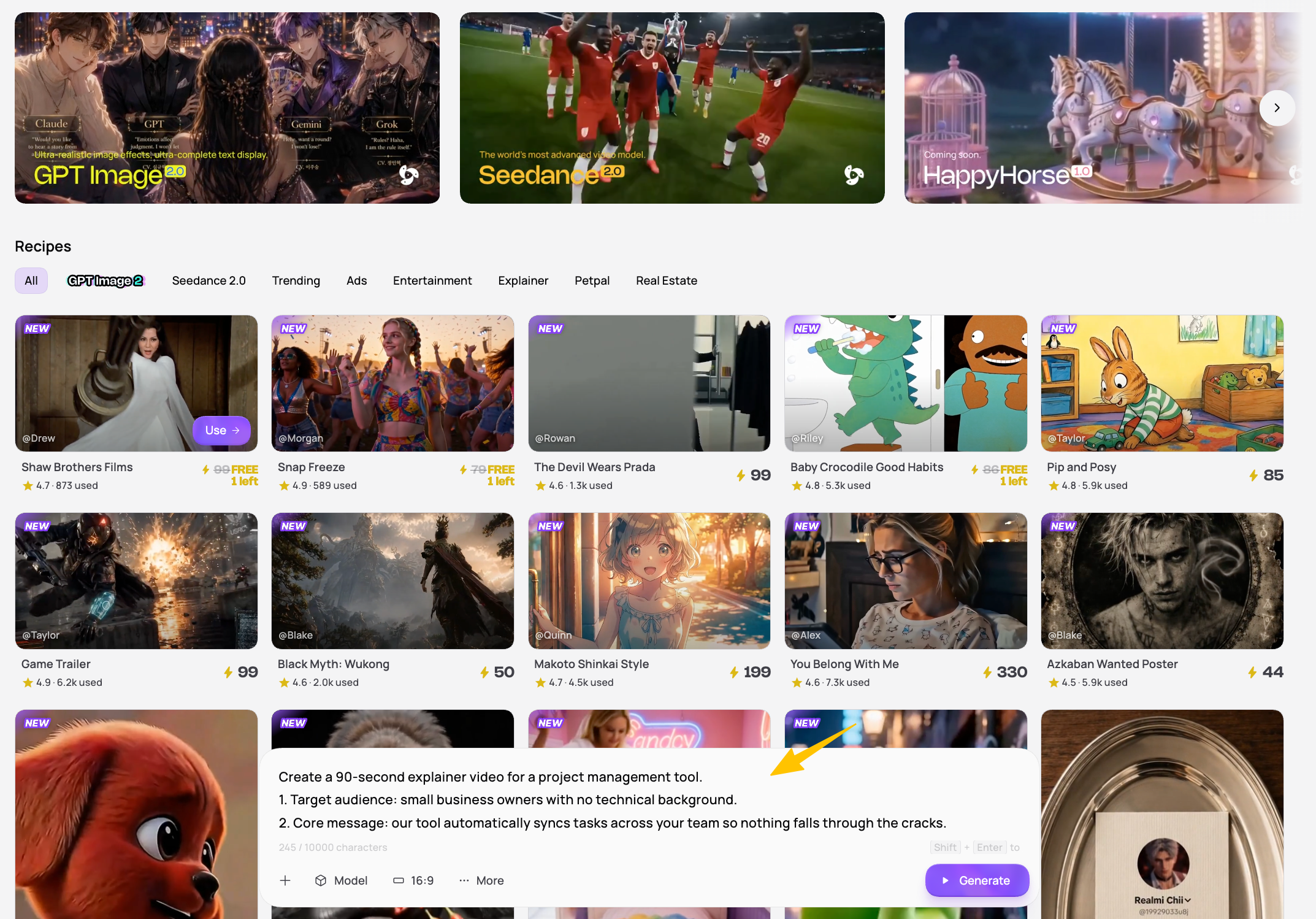
What is the one thing your viewer should understand after watching? If you're explaining a project management tool, the answer might be: "Our tool automatically syncs tasks across your team so nothing falls through the cracks." That's a complete concept. Keep the focus there — don't try to explain every feature in two minutes.
Who is actually watching this? A technical team watching an internal training video needs different language than a first-time website visitor. Your script, tone, and examples should be calibrated to the specific person watching.
Getting this right before you start saves you from rewriting the script halfway through production.
Step 2: Choose Your Video Format
Three decisions before you start:
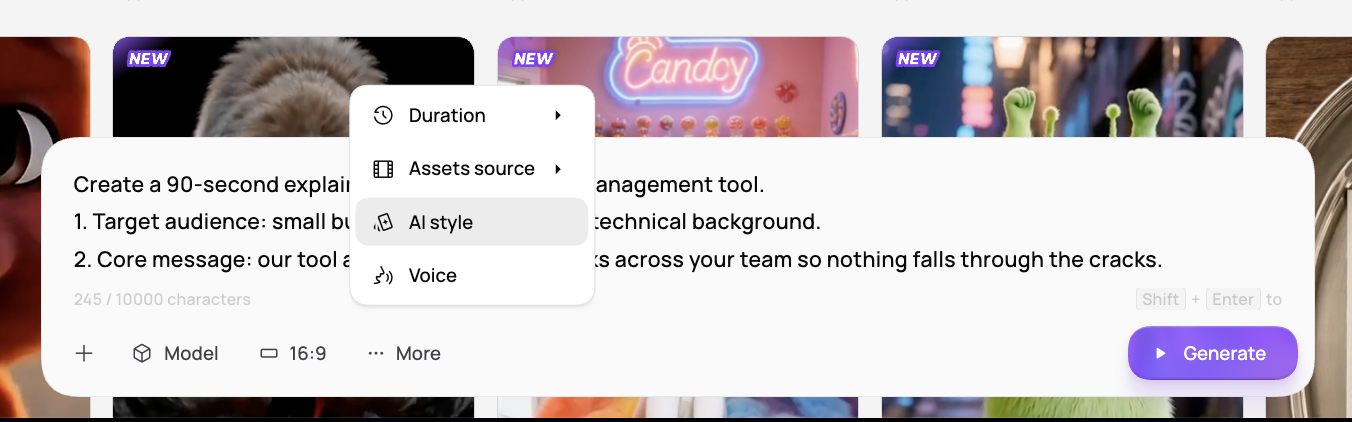
Duration. 30–60 seconds for social and homepage. 60–90 seconds for landing pages. 2–3 minutes for complex products or training. One video, one message — if it feels too long, you're explaining too much.
Visual style. Animated motion graphics for most tech and SaaS products. Cinematic AI footage for brand or premium content. Minimal and text-driven when clarity is the priority.
Voice. Energetic for launches and social. Calm and authoritative for finance or healthcare. Conversational for educational content.
In Medeo, specify all three upfront — duration, style, and voice — and the AI applies them consistently throughout.
If you're using an AI explainer video maker, animated and AI avatar formats are the easiest to produce at high quality. Medeo's explainer video tool handles animated and AI-generated visuals through a conversational interface — describe what you want, and it generates the video without requiring design or editing skills.
Step 3: Write Your Script
The script is the most important part of any explainer video. Visuals support the script — they don't replace it.
The classic explainer script structure:
Hook (0–5 seconds): Open with the problem, not the solution. Start with a question your audience is already asking, or a statement that immediately creates recognition. "If your customers don't understand your product in 30 seconds, you've already lost them."
Problem (5–15 seconds): Briefly expand on the pain point. Make the viewer feel understood. "Most explainer videos are too long, too complicated, or take weeks to produce."
Solution (15–40 seconds): Introduce your product or service as the fix. Be specific about what it does, not just what it is. "Medeo lets you describe your video in plain language and generates a complete, publish-ready explainer in minutes."
How it works (40–75 seconds): Show the key steps or features — three is the ideal number. Don't explain everything, just enough to make the solution feel real and believable.
Call to action (75–90 seconds): One clear instruction. "Try it free at medeo.app." Not two options, not a vague suggestion — one specific next step.
Script length guide:
90 seconds = ~225 words at a comfortable narration pace
60 seconds = ~150 words
30 seconds = ~75 words
Write for the ear, not the eye. Read it out loud. If a sentence sounds awkward when spoken, rewrite it.
You can use AI to generate a first draft. In Medeo, describe your product and target audience, and the AI produces a full structured script ready for review. It's faster to edit a draft than to start from a blank page.
Step 4: Generate the Explainer Video
This is where the actual production happens. The approach differs depending on the tool you use.
With Medeo:
Open a new project and describe the explainer video you want. Something like: "Create a 90-second animated explainer video for a project management SaaS. Audience: small business owners. Tone: professional but approachable. Key points: automatic task syncing, team visibility, deadline alerts. CTA: start free trial."
Medeo generates a complete draft — script (if you haven't provided one), visuals, voiceover, on-screen captions, and background music — from that description. The conversational interface means you can refine iteratively: "Make the opening more urgent," "Change the visual style to something more minimalist," "Show the product dashboard in the third section."
The AI selects from world-class models — including Sora, Kling, Midjourney, and Suno for music — automatically choosing the right tool for each component of the video.
Step 5: Review and Refine
Watch the draft from start to finish as your target viewer, not as the creator.
The 30-second test: If the first 30 seconds don't make the problem clear and hint at the solution, the video will lose viewers before it converts them. Fix the opening first.
Specific things to check:
Does the hook create immediate recognition in the first 5 seconds?
Is the narration pacing comfortable — not too fast to follow, not slow enough to lose attention?
Does each visual actually illustrate what's being said at that moment?
Is the call to action clear and specific?
Is the total length under 90 seconds? (Cut ruthlessly — every second that doesn't move the message forward is a second viewers might leave)
Give feedback in plain language: "The second section moves too slowly — tighten the narration," "The CTA needs to be bigger and held for longer," "Change the background music to something less distracting." Most AI video tools, including Medeo, apply these changes without requiring you to manually edit a timeline.
Step 6: Export and Publish
Once the video is final, get it in front of the right audience. A few placements worth prioritizing:
Your homepage. Embed it above the fold. Visitors who watch an explainer before reading anything else arrive at your product with context — they're faster to convert and ask better questions.
Product landing pages. One explainer per key use case. A visitor on your pricing page is in a different mindset than someone hitting a feature page — the video should match where they are.
Onboarding emails. Explainer videos in email sequences consistently outperform static content. Even a thumbnail with a play button drives more clicks than a paragraph of copy.
YouTube. An explainer indexed on YouTube builds discoverability over time — buyers searching for solutions in your category can find you before they've heard of you. For teams looking to build this out systematically, the YouTube content workflow is worth exploring.
Sales outreach. A personalized explainer link in a cold email performs significantly better than a text description. It shows the product, not just the pitch.
Format reference before you export:
Website / landing page: MP4, 1080p+, horizontal (16:9)
LinkedIn: MP4, horizontal, under 3 minutes
YouTube: MP4, 1080p or 4K
Instagram / TikTok / Shorts: MP4, vertical (9:16)
5 Things That Make a Good Explainer Video
1. Lead with the problem, not the product The most common mistake in explainer videos is opening with "We are [Company], and we make [Product]." Nobody cares — yet. Open with the problem your viewer recognizes, and they'll immediately want to know what comes next.
2. Keep it under 90 seconds Viewer retention drops significantly after 60–90 seconds for most explainer video formats. If you're struggling to fit your message into that window, you're trying to explain too much. Pick one message per video.
3. Write for one person, not a category "Small business owners" is a category. "A founder with five employees who can't get their team to update the project board" is a person. The more specific your mental image of the viewer, the more the script will resonate when they watch it.
4. One call to action, clearly stated Every explainer video should end with one specific next step. "Start your free trial," "Book a demo," "Watch how it works." Not three options — one. The more specific, the better the conversion rate.
5. Match the visual style to the audience's expectations A B2B enterprise product and a Gen Z consumer app need very different visual languages. Before generating your explainer, look at what the most trusted tools in your category look like. Match the aesthetic expectations of your audience — then find the element that makes yours distinctive.
Explainer Video Examples by Use Case
Product homepage explainer Goal: Convert first-time visitors who don't understand what you do. Structure: problem → solution → how it works → CTA. Length: 60–90 seconds. Format: animated or AI avatar.
Feature explainer Goal: Help existing users discover and use a specific feature. Structure: what the feature does → why it matters → three-step walkthrough → where to find it. Length: 60–90 seconds. Format: screencast + voiceover, or animated.
Educational explainer Goal: Build authority by teaching something useful. Structure: concept introduction → why it matters → how it works → practical takeaway. Length: 90–180 seconds. Format: animated with motion graphics.
Onboarding explainer Goal: Reduce time-to-value for new users. Structure: welcome → what to do first → what to do second → where to get help. Length: 60–90 seconds. Format: screencast + AI voiceover, or AI avatar.
Internal process video Goal: Document a workflow so teams can reference it without interrupting colleagues. Structure: process overview → step-by-step walkthrough → common mistakes → where to get help. Length: as long as needed, typically 2–5 minutes. Format: screencast.
For more use cases, see Medeo's real estate video examples and other industry-specific guides.
FAQ:What is an Explainer Video?
What is an explainer video?
An explainer video is a short video (typically 60–120 seconds) that explains a product, service, or concept in a simple, engaging way. It usually follows a structure of problem → solution → how it works → call to action. Explainer videos are most commonly used on product landing pages, homepages, and in onboarding flows.
How long should an explainer video be?
60 to 90 seconds is the standard for most explainer videos. Research consistently shows that viewer retention drops significantly after 90 seconds. If you need more time, consider breaking your content into multiple shorter videos — one per concept — rather than extending a single video past the two-minute mark.
What is the best AI explainer video maker?
The best AI explainer video maker depends on your format and use case. For animated explainers created through a conversational workflow, Medeo handles the full pipeline — script, visuals, voiceover, and music — without requiring design or editing skills. For avatar-based presenters, HeyGen is the strongest option. For repurposing existing written content, Pictory and InVideo AI work well.
Can I make an explainer video without any design skills?
Yes. AI explainer video makers are specifically designed for users without design or video editing backgrounds. You describe what you want in plain language, and the AI generates the visuals, voiceover, and final edit. Medeo's conversational interface means you refine the output through feedback, not through manually adjusting a timeline.
How do I write a script for an explainer video?
Follow the five-part structure: hook → problem → solution → how it works → call to action. Write for the ear — read it aloud and cut anything that sounds awkward when spoken. Target 150 words for a 60-second video, 225 words for 90 seconds. Lead with the problem your viewer has, not with your product's name or history.
What makes a good explainer video?
The best explainer videos are specific, short, and structured around a viewer's problem rather than a product's features. They open with immediate recognition, deliver on that hook quickly, show rather than tell wherever possible, and end with one clear call to action. Visual quality matters, but clarity of message matters more.
How do I make an animated explainer video for free?
Medeo, Canva, and InVideo AI all offer free plans for creating animated explainer videos. Free plans typically include watermarks or limited export resolution. Medeo's free plan gives you access to the full AI generation workflow — you can create and preview explainer videos before deciding whether to upgrade for watermark-free exports.
Make Your First Explainer Video
The fastest way to understand what works is to make one and watch how it performs.
Pick your most important use case — the page where visitors leave because they don't understand the product, or the feature that users never discover — and build a 60-second explainer around that single problem.
Describe it in plain language, let Medeo generate the draft, and refine it until it would make sense to someone who's never heard of your product. That's the bar. Once you clear it, you'll know exactly what to do for the next one.