AI Talking Avatar Generator: Create Talking Avatar Videos from Photos
Turn a portrait, avatar image, script, or audio file into a realistic talking avatar video. Medeo helps you create lip-synced avatar videos for social media, YouTube, presentations, online courses, product explainers, business training, and faceless creator content without filming yourself.
Create Every Talking Avatar Format
What Is a Talking Avatar Video Generator?
A talking avatar video generator is an AI tool that turns a face image, digital avatar, script, or voice recording into a video where the avatar appears to speak. It can animate mouth movement, facial motion, and presenter-style delivery so you can create talking head videos without a camera, studio, or live presenter.
From Static Photo to Speaking Avatar Video
Upload a portrait, avatar image, or character face, then add text or audio to create a lip-synced talking avatar video.
Before
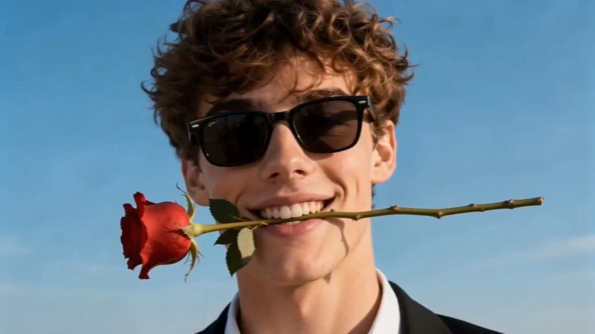
A portrait photo, avatar image, or character face
After
A speaking avatar video with lip sync, voice, facial motion, and captions
Create the Talking Avatar Formats People Search For
Medeo covers the main talking avatar workflows: photo to talking avatar, text-to-speech avatar, audio lip sync, talking head video, cartoon avatar, 3D-style avatar, and social-ready avatar videos.
Talking Avatar From Photo
Upload a clear portrait, headshot, avatar image, or character face and turn it into a speaking video.
Text to Speech Talking Avatar
Paste a script and create a talking avatar video with AI speech, natural pacing, and lip-synced facial animation.
Audio to Talking Avatar
Upload a voiceover, narration, podcast clip, or recorded speech and match the avatar's mouth movement to the audio.
Talking Head Avatar Videos
Create presenter-style videos for explainers, training, product demos, tutorials, announcements, and business content.
Cartoon, Anime, and 3D-Style Avatars
Use human portraits, cartoon characters, anime-inspired faces, brand mascots, or digital human-style avatars.
Shorts, TikTok, Reels, and YouTube
Export talking avatar clips for short-form social videos, creator channels, faceless pages, and platform-ready posts.
Make Talking Avatar Videos Without Filming
Create presenter-style videos from photos, scripts, or audio without scheduling a shoot, recording every take, or manually animating a face.
Photo to Video
Turn a Photo Into a Talking Avatar
Start with a portrait, selfie, character image, or avatar design. Medeo animates the face so the avatar can deliver your message as a video presenter.
Text to Speech
Paste a Script and Generate Speech
Use a written script for product explainers, lessons, intros, social clips, or business updates. The talking avatar can speak the message without you recording a presenter on camera.
Lip Sync
Match Uploaded Audio with Lip Sync
Already have a voiceover or narration? Use audio-driven talking avatar creation to match mouth movement, facial motion, and delivery to the recording.
Social Export
Create Avatar Videos for Every Channel
Make vertical avatar videos for TikTok, Reels, and Shorts, or create landscape talking head videos for websites, courses, YouTube, presentations, and business pages.
Talking Avatar Videos for Business, Education, and Creators
Use a talking avatar whenever you need a clear presenter, but do not want to film a person for every update.
Marketing and Product Demos
Create product explainers, feature launches, app walkthroughs, landing page videos, and promotional clips with a consistent avatar presenter.
Education and eLearning
Turn lessons, course modules, training scripts, and study explainers into talking avatar videos with narration and captions.
Corporate Training and Onboarding
Create HR updates, compliance explainers, onboarding videos, internal announcements, and repeatable training content.
Customer Support and FAQs
Answer common questions with avatar-led videos that can explain policies, product setup, troubleshooting, and account steps.
YouTube and Faceless Channels
Make talking avatar videos for commentary, explainers, list videos, news recaps, and creator intros without appearing on camera.
Presentations and Sales Videos
Create avatar-led pitch videos, slide explainers, proposal intros, real estate videos, and personalized outreach clips.
How to Create a Talking Avatar Video
Turn a photo, script, or audio file into a talking avatar video in a few simple steps.
Step 1
Upload a Photo or Avatar Image
Start with a clear face image, portrait, headshot, cartoon avatar, character image, or brand presenter you have permission to use.
Step 2
Add Text or Upload Audio
Paste a script for text-to-speech generation, or upload a recorded voiceover if you want the talking avatar to match existing audio.
Step 3
Choose the Video Style
Set the tone, platform, format, language, captions, background, and visual direction for your talking avatar video.
Step 4
Generate and Share
Preview the lip-synced avatar video, refine the script or visuals, then export for YouTube, TikTok, Reels, Shorts, websites, courses, or presentations.
Talking Avatar Script Examples
Use these prompt patterns to create talking avatar videos for different channels and audiences.
| Format | Script Direction |
|---|---|
| Product explainer | Create a friendly talking avatar video introducing a project management app. Explain the main problem, three key benefits, and a clear call to action. |
| Online course | Create a calm instructor-style avatar video explaining the first lesson of a beginner photography course, with short sections and readable captions. |
| Short-form social | Create a 30-second vertical talking avatar video with a strong hook, quick tips, animated captions, and an ending that encourages viewers to follow. |
| Customer support | Create a helpful talking avatar video explaining how to reset a password, with simple language, step-by-step instructions, and a reassuring tone. |
| Presentation intro | Create a professional avatar intro for a quarterly business presentation, welcoming viewers and summarizing the three topics covered. |
Tips for Better and Safer Talking Avatar Videos
A good talking avatar video should be clear, natural, and created with permission.
Use a Clear Face Image
Choose a front-facing portrait with good lighting, visible mouth shape, and minimal obstruction. Clear source images usually produce better talking avatar motion.
Keep Scripts Conversational
Write short sentences, natural phrasing, and clear pauses. Talking avatar videos feel better when the script sounds like something a real presenter would say.
Add Captions for Mobile Viewers
Use captions or subtitles for TikTok, Reels, Shorts, training videos, and social posts where many viewers watch without sound.
Use Likenesses and Voices Responsibly
Create with photos, characters, and voice recordings you own or have permission to use. Avoid misleading impersonation or unauthorized use of private people, celebrities, or public figures.
Talking Avatar Generator vs Lip Sync, Voiceover, and Video Editors
Talking avatar creation overlaps with several workflows. Choose the one that matches your starting material.
Use Talking Avatar When You Need a Presenter
Choose this workflow when you want a face or character to speak a message as a video presenter.
Use Lip Sync When You Already Have a Video
If you already have a person or character video and only need to sync speech, a dedicated lip-sync workflow may be better.
Use Text to Video for Scene Generation
If you want to generate a visual scene from a prompt rather than animate a face, use a text-to-video workflow.
Use Faceless Video for Narration Without an Avatar
If you only need narration, stock visuals, captions, and motion graphics, a faceless video workflow may be simpler.
AI Talking Avatar Generator FAQs
Answers about creating talking avatars from photos, text, audio, scripts, and avatar images for social media, education, business, and creator content.
Explore More AI Avatar and Video Tools
Use Medeo to create more avatar videos, lip-sync clips, faceless videos, captions, and social content.