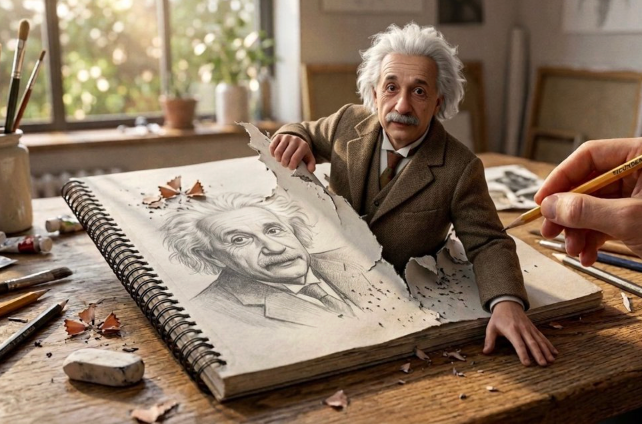
Seedance 2.0: Try ByteDance's AI Video Generator on Medeo
Generate cinematic videos from text, images, audio, and video — all in one platform. Seedance 2.0 is ByteDance's most advanced AI video model, now available on Medeo with free trial credits to get you started. No experience needed. No VPN required.
What Is Seedance 2.0?
Seedance 2.0 is ByteDance's latest AI video generation model, released in February 12, 2026. It accepts text, images, videos, and audio as inputs — up to 12 multimodal assets in a single generation — and produces cinematic multi-shot video with native audio sync, consistent characters, and director-level camera control. Unlike single-input video generators, Seedance 2.0 uses a unified architecture that processes all modalities together, delivering results that feel directed rather than randomly generated.
Multimodal AI Video Generation by ByteDance
Seedance 2.0 combines text prompts, reference images, video clips, and audio files into a single generation pipeline. You can describe a scene in words, upload character photos for consistency, reference a video for motion style, and provide audio for dialogue sync — all at once. The model reads each input's role automatically and produces a cohesive, cinematic output.
Dual-Branch Diffusion — Image and Sound Generated in Parallel
At its core, Seedance 2.0 uses a dual-branch diffusion architecture. One branch generates the visual frames while the other synthesizes audio — dialogue, ambient sound, background music, and sound effects — in parallel. The two branches stay synchronized throughout the generation process, so lip movements match speech, footsteps match walking pace, and music follows the narrative rhythm. No post-production audio stitching needed.
Core Capabilities of Seedance 2.0 AI Video Generator
Seedance 2.0 isn't just another text-to-video tool. It's a multimodal creative engine built for professional-grade output. Here are the five capabilities that set it apart.
Omni-Reference — Fuse Up to 12 Multimodal Assets in One Generation
Seedance 2.0's Omni-Reference system lets you combine up to 9 images, 3 video clips, and 3 audio files in a single generation. Each asset is automatically understood — whether it's a character reference, a style guide, a motion template, or dialogue input. The model fuses them intelligently, so you get a video that incorporates all your creative inputs without manual layering or post-production compositing. This means you can upload a character photo, a background scene, a style reference, and a voice clip — and Seedance 2.0 will generate a video that combines all four seamlessly.
Extreme Character Consistency Across Every Shot
One of the hardest problems in AI video is keeping characters looking the same across multiple shots. Seedance 2.0 solves this with locked character identity — faces, clothing, hairstyles, and body proportions stay consistent from the first frame to the last, even across different scenes, camera angles, and lighting conditions. Upload a single reference image, and the model maintains that character's appearance through every shot in your video. This is essential for storytelling, brand mascots, and multi-scene narratives where visual continuity matters.
Motion and Style Cloning from Any Reference Video
Want your video to move like a specific reference? Seedance 2.0 can analyze a reference video and replicate its motion dynamics — camera movements, character gestures, pacing, and rhythm — in a completely new scene. Upload a 15-second clip as a motion template, and the model transfers that movement language to your generated video. This goes beyond simple style transfer. Seedance 2.0 understands choreography, camera language, and physical dynamics, so the cloned motion feels natural rather than pasted on.
Director-Level Camera Language and Multi-Shot Narrative
Seedance 2.0 supports cinematic camera control at a professional level — dolly shots, tracking shots, crane movements, Dutch angles, rack focus, and more. You can describe camera movements in natural language, and the model executes them with precision. For multi-shot projects, Seedance 2.0 handles shot-to-shot transitions automatically. Character positions, lighting, and visual style stay consistent across cuts, so you can build a complete narrative sequence — with natural shot connections, narration sync, and camera angle changes — in a single generation pass.
Native Audio Sync — Dialogue, Music, and Sound Effects Auto-Generate
Seedance 2.0 generates audio alongside video in one unified pass. This includes synchronized dialogue with accurate lip-sync, ambient soundscapes that match the environment, background music that follows the narrative rhythm, and sound effects tied to on-screen actions. There's no need to add audio in post-production. The dual-branch architecture ensures that every footstep, every word of dialogue, and every musical beat is generated in sync with the visual timeline. The result is a complete audiovisual experience from a single generation.
How to Use Seedance 2.0 on Medeo
Getting started with Seedance 2.0 on Medeo takes less than a minute. No downloads, no installations, no VPN — just sign up and start creating.
Step 1
Enter Your Prompt or Upload References
Describe what you want to see in natural language. Be as specific or as creative as you like. You can also upload reference images for character consistency, video clips for motion style, and audio files for dialogue sync. Seedance 2.0 supports up to 12 multimodal inputs per generation.
Step 2
Choose Seedance 2.0 and Settings
Select Seedance 2.0 as your model. Choose your resolution (up to 4K), aspect ratio (16:9, 9:16, 1:1), and video duration. You can also specify camera movements, lighting preferences, and audio requirements in your prompt for more precise control.
Step 3
Generate and Download Your Video
Click "Generate" and let Seedance 2.0 work. In seconds to minutes, depending on complexity, you'll have a cinematic video with synchronized audio. Download it directly, refine specific segments, or generate variations with different settings.
What You Can Create with Seedance 2.0
Seedance 2.0 handles everything from short-form social content to cinematic narratives. Here are the most popular use cases.
Cinematic Short Films and Multi-Shot Storytelling
Build complete short films with multiple shots, consistent characters, and native audio. Seedance 2.0 handles shot transitions, camera movements, and audio sync automatically — so you get a polished narrative without editing software. Perfect for indie filmmakers, content studios, and storytellers who want to prototype ideas fast.
2D and 3D Animation Generation
Generate animated sequences in 2D, 3D, or mixed styles. From anime-inspired scenes to Pixar-style 3D animation, Seedance 2.0 adapts to your desired visual style through reference images and style prompts. Great for animators, game studios, and creators who want to produce animation without traditional tools.
Marketing Videos and Ad Campaigns
Create polished promotional videos from product photos, brand guidelines, and campaign briefs. Seedance 2.0 maintains brand consistency across multiple ad variations, generates multiple versions for A/B testing, and produces broadcast-quality output suitable for paid media placement.
Social Media Content for TikTok and Reels
Produce beat-matched, engaging short-form content optimized for vertical formats. Seedance 2.0 generates smooth motion continuity, eye-catching transitions, and audio that matches platform trends — perfect for creators, influencers, and social media managers scaling their content output.
Fantasy and Fairy Tale Scenes
Bring imaginative worlds to life. Whether it's a fairy tale forest, a futuristic cityscape, or a mythical creature in action, Seedance 2.0 handles complex fantasy scenes with cinematic quality. Upload style references to match a specific artistic vision, and let the model generate immersive, story-driven content.
Seedance 2.0 vs Kling 3.0 vs Veo 3.1 — Which AI Video Model Should You Use?
Seedance 2.0 vs Kling 3.0 vs Veo 3.1: Which AI Video Model Is Right for You? Seedance 2.0, Kling 3.0, and Veo 3.1 are among the most advanced AI video models available today. While all three can generate high-quality videos from text and images, each excels in different areas. Seedance 2.0 stands out for multi-shot storytelling, character consistency, and reference-based generation. Its unique multi-reference system supports up to 12 image, video, and audio references, making it ideal for creators who need consistent characters, scenes, and visual styles across multiple shots. It also delivers highly accurate multilingual lip-syncing and natural human motion. Kling 3.0 is designed for fast, cost-effective video creation. It offers strong prompt adherence, native 4K output, and quick rendering speeds, making it a popular choice for everyday content production, social media videos, and rapid creative iteration. Veo 3.1 focuses on cinematic realism and professional-grade production quality. It excels at complex lighting, realistic textures, environmental interactions, and high-fidelity native audio generation, making it well-suited for commercial projects and film-style content.
| Feature | Seedance 2.0 | Kling 3.0 | Veo 3.1 |
|---|---|---|---|
| Primary Strength | Character consistency and multi-shot storytelling | Fast, affordable content generation | Cinematic realism and production quality |
| Motion Quality | Excellent | Very Good | Excellent |
| Character Consistency | Excellent | Good | Very Good |
| Reference Controls | Up to 12 multimodal references | 1–2 reference images | Advanced camera and motion controls |
| Lip Sync Quality | Industry-leading multilingual lip sync | Good | Very Good |
| Native Audio Generation | Yes | No | Yes |
| Maximum Video Length | Up to 15 seconds | Up to 10 seconds | Starts at 8 seconds (extendable) |
| Rendering Speed | Fast | Very Fast | Moderate |
| Native 4K Output | No | Yes | No |
| Best For | Storyboards, character-driven videos, multi-angle scenes | Daily content creation, social media, fast iterations | Commercial ads, hero videos, cinematic projects |
Which Model Should You Choose?
Choose Seedance 2.0 if you need consistent characters, multiple camera angles, reference-based generation, or realistic lip-syncing.
Choose Kling 3.0 if speed, affordability, and high-volume content production are your priorities.
Choose Veo 3.1 if you're creating cinematic, movie-quality videos with advanced lighting and audio requirements.
For most creators, marketers, and storytellers, Seedance 2.0 offers the best balance of control, consistency, motion quality, and creative flexibility.
Seedance 2.0 Price — How Much Does It Cost?
Seedance 2.0 is a premium AI video model, and pricing varies depending on the platform, resolution, and generation settings. On official and third-party platforms, generating a 720p Seedance 2.0 video typically costs around 4.84 credits per second, while 1080p generation can reach 12.11 credits per second. Higher resolutions, audio generation, and advanced controls may further increase the cost.
Generate Seedance 2.0 Videos on Medeo
Medeo provides access to Seedance 2.0 alongside other leading AI video models through a single subscription. With Medeo, you can create Seedance 2.0 videos directly from chat, combine multiple AI models in one workflow, and access advanced video editing tools without managing separate subscriptions for different platforms.
| Plan | Monthly Price (Annual Billing) | Credits Included |
|---|---|---|
| Free | $0 | Free trial access |
| Pro | $28/month | 700 credits/month |
| Insider | $76/month | 2,400 credits/month |
| Elite | $236/month | 9,000 credits/month |
Why Choose Medeo for Seedance 2.0
Access Seedance 2.0 Without Platform Restrictions
Generate videos with Seedance 2.0 directly from chat. No complicated setup, model switching, or separate accounts required. Simply describe your idea, upload references, and let Medeo handle the workflow.
More Than Seedance — All Top AI Video Models in One Place
Compare and create with Seedance 2.0, Veo, Kling, Sora, and other leading AI video models from a single workspace. Choose the best model for each project without paying for multiple subscriptions.
Create, Edit, and Iterate Faster
Medeo combines AI video generation with built-in editing tools, allowing you to refine prompts, regenerate scenes, edit clips, and produce final videos in one streamlined workflow instead of jumping between different platforms.
FAQs about Seedance 2.0
See What Our Users are Saying about Seedance 2.0
"Seedance 2.0 on Medeo produces some of the smoothest AI videos I've seen. The motion feels natural, and the visual quality is consistently impressive."
Alex Carter
Video Creator
"What sets Seedance 2.0 apart is its ability to follow complex prompts accurately. Medeo makes it incredibly easy to access and use its full potential."
Emily Foster
Creative Director
"We use Seedance 2.0 through Medeo to create promotional videos for campaigns. The results look polished enough for professional marketing materials."
Ryan Mitchell
Marketing Manager
"Seedance 2.0 on Medeo produces some of the smoothest AI videos I've seen. The motion feels natural, and the visual quality is consistently impressive."
Alex Carter
Video Creator
"What sets Seedance 2.0 apart is its ability to follow complex prompts accurately. Medeo makes it incredibly easy to access and use its full potential."
Emily Foster
Creative Director
"We use Seedance 2.0 through Medeo to create promotional videos for campaigns. The results look polished enough for professional marketing materials."
Ryan Mitchell
Marketing Manager
"The character consistency and scene coherence are outstanding. Even multi-subject prompts generate videos that feel cinematic and well-structured."
Sophia Nguyen
Content Creator
"Seedance 2.0 has become my preferred AI video model for storytelling. Medeo's workflow makes generating, refining, and iterating videos much faster than expected."
Daniel Brooks
Independent Filmmaker
"I love how quickly I can turn ideas into high-quality videos. Seedance 2.0 delivers excellent motion and detail, while Medeo keeps the entire process simple and efficient."
Olivia Bennett
Social Media Strategist
"The character consistency and scene coherence are outstanding. Even multi-subject prompts generate videos that feel cinematic and well-structured."
Sophia Nguyen
Content Creator
"Seedance 2.0 has become my preferred AI video model for storytelling. Medeo's workflow makes generating, refining, and iterating videos much faster than expected."
Daniel Brooks
Independent Filmmaker
"I love how quickly I can turn ideas into high-quality videos. Seedance 2.0 delivers excellent motion and detail, while Medeo keeps the entire process simple and efficient."
Olivia Bennett
Social Media Strategist
Explore More AI Video Models and Tools on Medeo
Medeo gives you access to the world's leading AI video and image models — all under one account. Explore what else you can create:
Learn More About Seedance 2.0
Want to go deeper? Explore our guides on getting the most out of Seedance 2.0:
7 Best AI Love Story Video Generators in 2026 (Tested & Compared)
Discover the 7 best AI love story video generators in 2026 — tested and compared. From cinematic narratives to anniversary films, find the right tool for every romantic occasion.
TIAN YUAN · Apr 29, 2026 · 13 min read
How to Make an Explainer Video with AI (Step-by-Step Guide for 2026)
Learn how to make a professional explainer video with MedeAI in 2026 — no editing skills required. Step-by-step guide covering script, visuals, voiceover, and publishing.
TIAN YUAN · Apr 29, 2026 · 13 min read
How to Make Faceless Videos with AI (Step-by-Step Guide for 2026)
Learn how to make faceless videos with Medeo AI in 2026. Covers formats, niches, platforms, and a complete step-by-step production workflow.
TIAN YUAN · Apr 29, 2026 · 16 min read