Supawork AI Review: Features, Pricing, Pros, Cons, and Best Alternative
Supawork AI is easy to notice because it does not position itself as only one AI tool. It presents itself as an all-in-one AI workspace with tools for video, image editing, writing, resumes, study tasks, and creative content. That broad positioning explains why people search for terms like “supawork ai,” “supawork ai video watermark remover,” “supawork ai face swap,” “supawork ai headshot generator,” and “supawork ai image to video generator.”
But that also creates an important question: is Supawork AI actually strong as a creative video tool, or is it mainly a collection of useful mini tools?
In this Supawork AI review, we will look at its main features, pricing, strengths, limitations, safety concerns, and best use cases. We will also compare it with Medeo as a Supawork AI alternative for creators who care more about video creation, AI model workflows, and turning ideas, images, scripts, and links into videos.
Quick Verdict: Is Supawork AI Worth It?
Supawork AI is worth trying if you want a broad collection of simple AI tools in one place. It is especially relevant for users who need quick access to tools like video watermark removal, face swap, AI headshots, image editing, resume tools, and basic AI video generation.
It is less ideal if your main goal is a deeper AI video creation workflow. Supawork AI feels more like a tool hub. That can be convenient, but creators who want to build repeatable video content may eventually need a more focused workspace.
Medeo is a better fit if your priority is AI video creation rather than general-purpose AI utilities. With Medeo, users can create videos from text, images, audio, videos, and links, making it more suitable for marketers, creators, and teams that need a connected video workflow instead of a collection of separate tools.
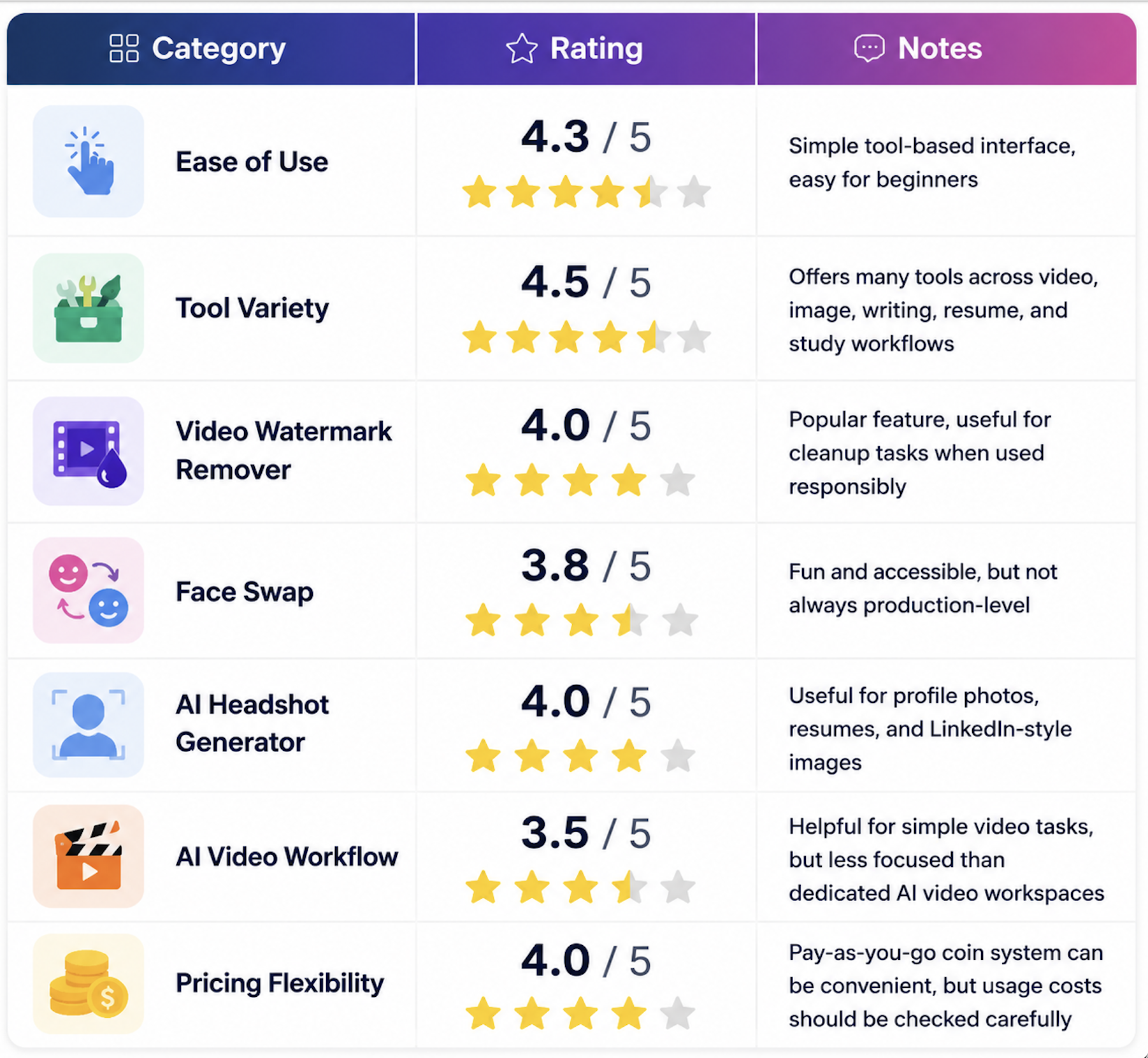
Supawork AI Rating
What Is Supawork AI?
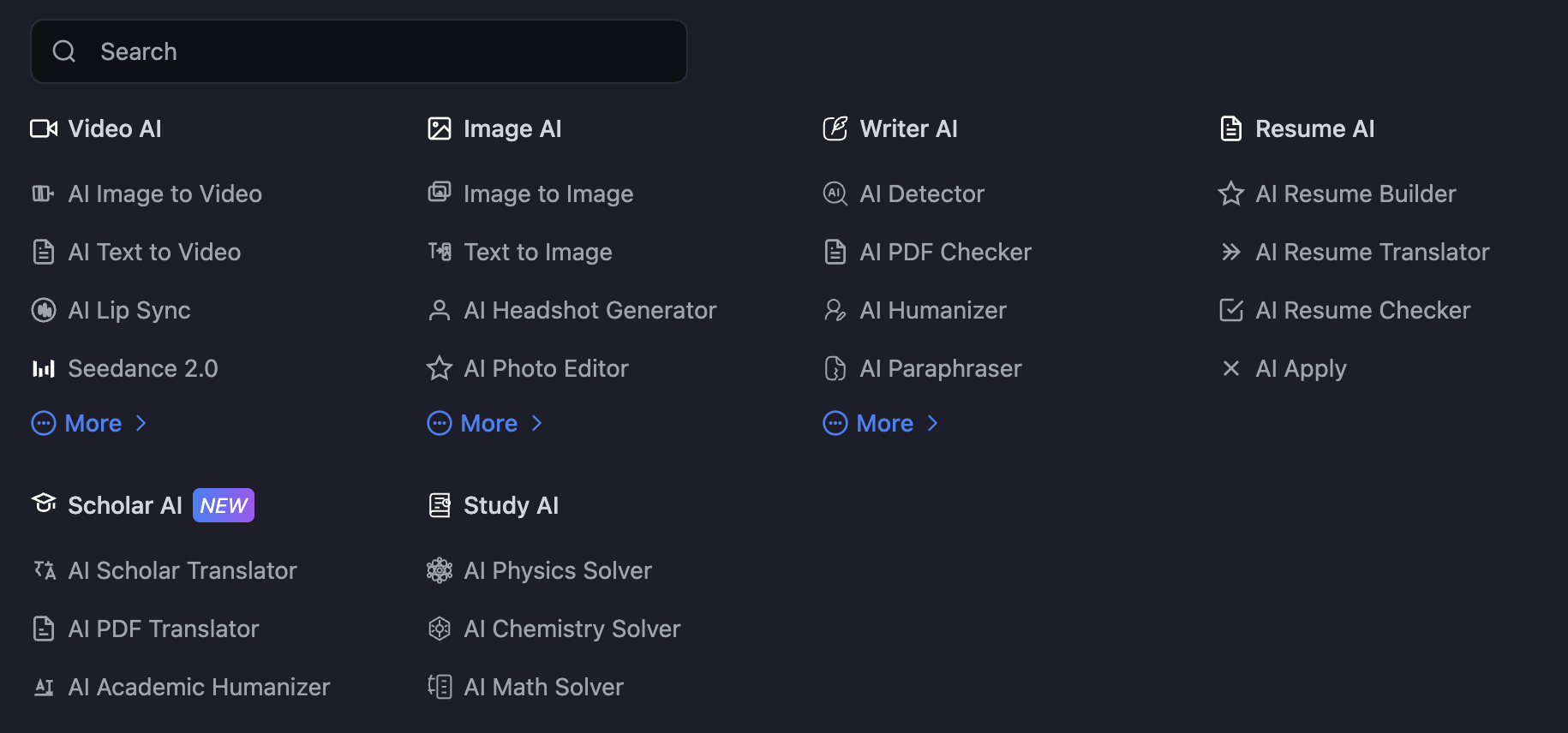
Supawork AI is an online AI platform that brings many tools into one workspace. Its official site lists tools across several categories, including Video AI, Image AI, Writer AI, Resume AI, Scholar AI, and Study AI. This makes Supawork AI broader than a single video generator or image editor.
For creative users, the most relevant tools include AI image to video, AI text to video, AI lip sync, AI video face swap, AI image face swap, AI headshot generator, AI photo editor, and video watermark remover. For career-focused users, Supawork AI also offers resume-related tools and professional headshot tools.
This wide range is the main appeal of Supawork AI. A user can open one site and try many different AI utilities without looking for a separate tool every time. The tradeoff is that not every tool feels equally deep. Some users may like the convenience, while others may prefer a more specialized platform for serious video creation.
Who Is Supawork AI Best For?
Supawork AI is best for users who want quick, lightweight AI tools. It can be useful for someone who wants to remove a watermark from their own video, swap faces for fun content, create a professional headshot, edit images, or test a basic AI video idea.
It is also useful for users who do not want to learn complex creative software. Many Supawork AI tools are designed around simple upload-and-generate workflows. That makes the platform approachable for beginners.
However, users who need more creative control may find Supawork AI limited. If your main goal is to create polished social videos, product explainers, campaign videos, AI image-to-video scenes, or text-to-video content at scale, a video-focused workspace like Medeo may be more practical.
Supawork AI Key Features
1. AI Video Watermark Remover
The highest-intent keyword in the Supawork AI keyword set is “supawork ai video watermark remover.” That tells us this is one of the biggest reasons users search for Supawork AI.
Supawork’s video watermark remover is designed to help users upload a video, mark the watermark area, remove it, and download a cleaner version. Its official page describes a simple three-step workflow: upload the video, mark and remove the watermark, then download the cleaned video.
This feature can be useful for creators who need to clean up their own footage, remove outdated overlays from assets they own, or prepare videos for reuse. However, it should be used responsibly. Removing watermarks from copyrighted videos, stock footage, third-party creator content, or platform-owned videos without permission can create legal and ethical problems.
This is an important limitation to mention in any honest Supawork AI review. The tool may be useful, but the user is still responsible for having the right to edit and reuse the video.
2. AI Face Swap
Supawork AI also receives search interest around “supawork ai face swap,” “supawork ai face swap video,” and “supawork ai video face swap.” The face swap tool is designed for swapping faces in images or videos through an online workflow.
This type of tool is popular because it is easy to understand and produces visually interesting results quickly. It can be used for entertainment, social content, parody, character ideas, and creative experiments.
The limitation is quality and responsibility. Face swap results can vary depending on the source image, lighting, angle, resolution, and motion complexity. More importantly, users should avoid using someone’s likeness without permission. Face swap tools should not be used for impersonation, harassment, misleading content, or non-consensual edits.
For casual creative experiments, Supawork AI face swap can be useful. For professional brand or client work, users should review quality and consent carefully before publishing.
3. AI Headshot Generator
Another strong search cluster is “supawork ai headshot generator,” “supawork ai professional headshot generator,” and “supawork ai linkedin photo generator.” This makes sense because Supawork AI has roots in career and resume-related workflows.
The AI headshot generator is useful for users who want a professional-looking profile photo without booking a studio shoot. It can help create images for LinkedIn, resumes, portfolios, personal websites, and job applications.
The biggest advantage is accessibility. A user can generate polished profile images quickly. The limitation is that AI headshots may not always preserve identity perfectly. Some results may look too stylized, too retouched, or slightly different from the person’s real appearance. For job search or professional use, users should choose outputs that still look authentic.
4. AI Image to Video Generator
Supawork AI also offers AI image-to-video generation. This feature is relevant for creators who have a still image and want to turn it into a moving clip. It can be useful for social media content, product visuals, character scenes, animated portraits, and creative storytelling.
Image-to-video is one of the fastest-growing AI video workflows because many users already have strong images. They may have product photos, AI-generated artwork, portraits, thumbnails, or concept visuals. Turning those into motion can make content more engaging.
Still, image-to-video quality depends heavily on the input image and prompt direction. A clean image with a clear subject usually works better than a crowded or low-resolution image. Complex motion can also be harder to control.
5. AI Video Generator
Supawork AI’s video generator page emphasizes creating videos without watermarks, using text commands, style options, and fast processing. It positions the tool for social media, marketing, education, and personal content.
This is useful for beginners who want simple AI video creation. However, Supawork AI’s video workflow appears more tool-based than production-based. If you only need a quick video result, that may be enough. If you need to plan, iterate, compare models, create multiple assets, and build a consistent content workflow, the experience may feel limited.
This is where Medeo becomes a stronger alternative. Medeo is built around AI video creation as a workflow. Users can start from text, images, audio, videos, or links, then refine their output through a more connected creative process.
Supawork AI Pricing
Supawork AI uses a coin-based pricing model. Based on its official pricing page, current public pay-as-you-go options include packages such as $9.99 for 400 coins, $14.99 for 800 coins, $37.99 for 3000 coins, and $89.99 for 8000 coins. These prices may change, so users should always check Supawork AI’s official pricing page before purchasing.
The coin model can be convenient because users can buy credits when needed instead of committing to a large subscription immediately. It may be a good fit for casual users who only need occasional watermark removal, image editing, headshots, or creative tests.
The main thing to check is how many coins each task consumes. A pricing page can look affordable, but the actual value depends on the cost per usable result. If a user needs multiple attempts to get the right face swap, headshot, or video output, the effective cost can increase.
What Supawork AI Does Well
Supawork AI’s biggest strength is convenience. It gives users many tools in one place, covering video, image editing, writing, resume help, study tools, and creative effects. For casual users, this is useful. They can try different tasks without searching for a new website every time.
It is also beginner-friendly. Many tools use a simple upload-and-generate workflow, which lowers the learning curve. This is especially useful for users who do not want to learn professional editing software.
Supawork AI is also strong in search-driven utility tools. Its watermark remover, face swap, and headshot generator match clear user needs. People searching for these tools usually want a fast result, not a complicated production workflow.
Another advantage is pricing flexibility. The pay-as-you-go coin model may appeal to users who do not want a monthly subscription. If someone only needs occasional AI edits, buying coins can be easier than paying for a full creative suite.
Where Supawork AI Feels Limited
Supawork AI’s main weakness is also connected to its biggest strength. Because it offers so many tools, it can feel like a broad tool directory rather than a focused creative workflow.
This matters most for video creators. Creating a good AI video is not just about generating one clip. A real video workflow may involve script planning, prompt refinement, image creation, image-to-video animation, model selection, editing, captions, upscaling, link-to-video repurposing, and multiple exports.
Supawork AI can help with individual tasks, but it may not feel as connected for users who want to build videos consistently.
Another limitation is output consistency. Tools like face swap, image-to-video, and watermark removal can vary depending on input quality. This is common across AI tools, but users should expect some trial and error.
There is also a trust issue around sensitive uploads. If users upload personal photos, face images, resumes, or videos, they should review the platform’s privacy policy and terms carefully. This is especially important for face swap, headshot generation, and career-related documents.
Supawork AI vs Medeo
Supawork AI and Medeo overlap in AI video and creative tools, but they are built around different priorities.
Supawork AI is broader. It includes many tools across video, image editing, resume creation, writing, study support, and utility tasks. It is useful for users who want many quick AI tools in one place.
Medeo is more focused on AI video creation. It is designed for users who want to turn ideas, text, images, audio, videos, and links into video content through a more connected creative workflow.

If you need a quick watermark remover, face swap tool, or AI headshot generator, Supawork AI may be convenient. If you need to create AI videos for marketing, social media, education, product storytelling, or content repurposing, Medeo is likely the stronger fit.
If you are looking for a Supawork AI alternative specifically for video creation, Medeo is the stronger option to consider.
Medeo is not just a single AI video generator. It is a video-first AI workspace built for users who want to create videos from different starting points. You can begin with a prompt, a script, an image, a link, audio, or existing video material. That flexibility matters because real creative projects rarely begin the same way every time.
A marketer may start with landing page copy. A creator may start with an AI-generated image. A product team may start with a URL. A teacher may start with a lesson outline. A social media manager may start with a short concept. Medeo gives these users a more natural way to move from source material to video.
For text-based workflows, users can explore Medeo’s text-to-video tool:
For image-based workflows, users can explore Medeo’s image-to-video tool:For users who want to create directly from a link or webpage, Medeo also supports URL-to-video workflows:
And for creators comparing AI video models, Medeo also provides access to model pages such as Seedance 2.0
This is where Medeo’s advantage becomes clear. Supawork AI is useful when you need individual AI tools. Medeo is better when your main goal is to build videos through a flexible, connected workflow.
Who Should Choose Supawork AI?
Supawork AI makes sense for users who want quick access to many AI utilities. If you need a watermark remover, a face swap tool, a headshot generator, or a simple image/video experiment, it can be useful.
It is also a reasonable choice for casual users who do not want to subscribe to a large creative suite. The pay-as-you-go model may work well if you only need occasional tasks.
Supawork AI is especially suitable for users who value variety more than depth. If you want to try many different AI tools from one place, its broad tool library is appealing.
Who Should Choose Medeo?
Medeo makes more sense for users whose main goal is video creation. If you want to turn ideas into videos, animate images, repurpose links, create social clips, test AI models, or build repeatable video workflows, Medeo is the better fit.
It is especially useful for marketers, creators, founders, educators, agencies, and small teams. These users often need to produce videos from different materials without learning complex editing software.
Medeo is also a better fit if you care about the full path from concept to output. Instead of using separate tools for text, images, links, and video generation, Medeo gives users a more unified creative process.
FAQ About Supawork AI
What is Supawork AI?
Supawork AI is an online AI workspace that offers tools for video generation, image editing, face swap, watermark removal, headshot generation, writing, resumes, study support, and other AI-powered tasks.
Is Supawork AI free?
Supawork AI offers some tools and free access options, but many features may depend on credits, coins, or paid usage. Pricing and free limits can change, so users should check the official Supawork AI pricing page before using it heavily.
How much does Supawork AI cost?
Supawork AI uses a coin-based pricing model. Its official pricing page currently lists pay-as-you-go packages such as $9.99 for 400 coins, $14.99 for 800 coins, $37.99 for 3000 coins, and $89.99 for 8000 coins. Prices may change, so always confirm on the official pricing page.
What is Supawork AI video watermark remover?
Supawork AI video watermark remover is a tool designed to remove logos, text, timestamps, and other marks from videos. It should be used only on videos you own or have permission to edit.
Does Supawork AI have face swap?
Yes. Supawork AI offers face swap tools for images and videos. Users should use these tools responsibly and avoid editing someone’s likeness without consent.
Does Supawork AI have an AI headshot generator?
Yes. Supawork AI offers AI headshot and professional profile photo tools, which may be useful for LinkedIn, resumes, portfolios, and personal branding.
Does Supawork AI support image to video?
Yes. Supawork AI includes image-to-video tools that can turn still images into moving clips for social media, creative projects, or marketing content.
Is Supawork AI legit?
Supawork AI is a real online AI platform with public tools, pricing, and multiple AI feature categories. Users should still review its privacy policy, terms, and payment details before uploading sensitive content or purchasing coins.
Is Supawork AI safe?
Supawork AI can be used like other web-based AI tools, but users should be cautious when uploading personal photos, resumes, videos, or face images. Always check privacy and content usage policies before using sensitive materials.
What is the best Supawork AI alternative?
Medeo is a strong Supawork AI alternative if your main goal is AI video creation. It supports text-to-video, image-to-video, URL-to-video, and broader AI video workflows for creators and teams.
Is Supawork AI better than Medeo?
It depends on the use case. Supawork AI is better if you want many small AI tools in one place. Medeo is better if you want a focused AI video creation workspace for turning ideas, images, scripts, audio, videos, and links into video content.
Can I use Supawork AI for commercial projects?
Commercial usage depends on Supawork AI’s current terms, the specific tool, and the materials you upload. For watermark removal, face swap, or headshot generation, make sure you have the right to use and modify the source content.
Final Verdict
Supawork AI is a useful all-in-one AI tool hub. It offers many practical tools, including video watermark remover, face swap, AI headshot generator, image editing, resume tools, writing tools, and basic AI video generation. For casual users who want quick AI utilities, it is worth trying.
Its main limitation is depth. Supawork AI has many tools, but users who care most about video creation may need a more focused workflow. Creating good AI videos often requires more than one generation. It may involve text prompts, images, links, video models, editing, revisions, and multiple output formats.
That is where Medeo stands out. If you want a Supawork AI alternative built around AI video creation, Medeo is better suited for turning ideas, images, audio, videos, and links into video content through a more connected workflow.
Use Supawork AI if you want a broad AI utility toolbox. Use Medeo if you want a video-first AI creation workspace.