Pollo AI Is the AI Video Mall. These Tools Are Better When You Know What You Want
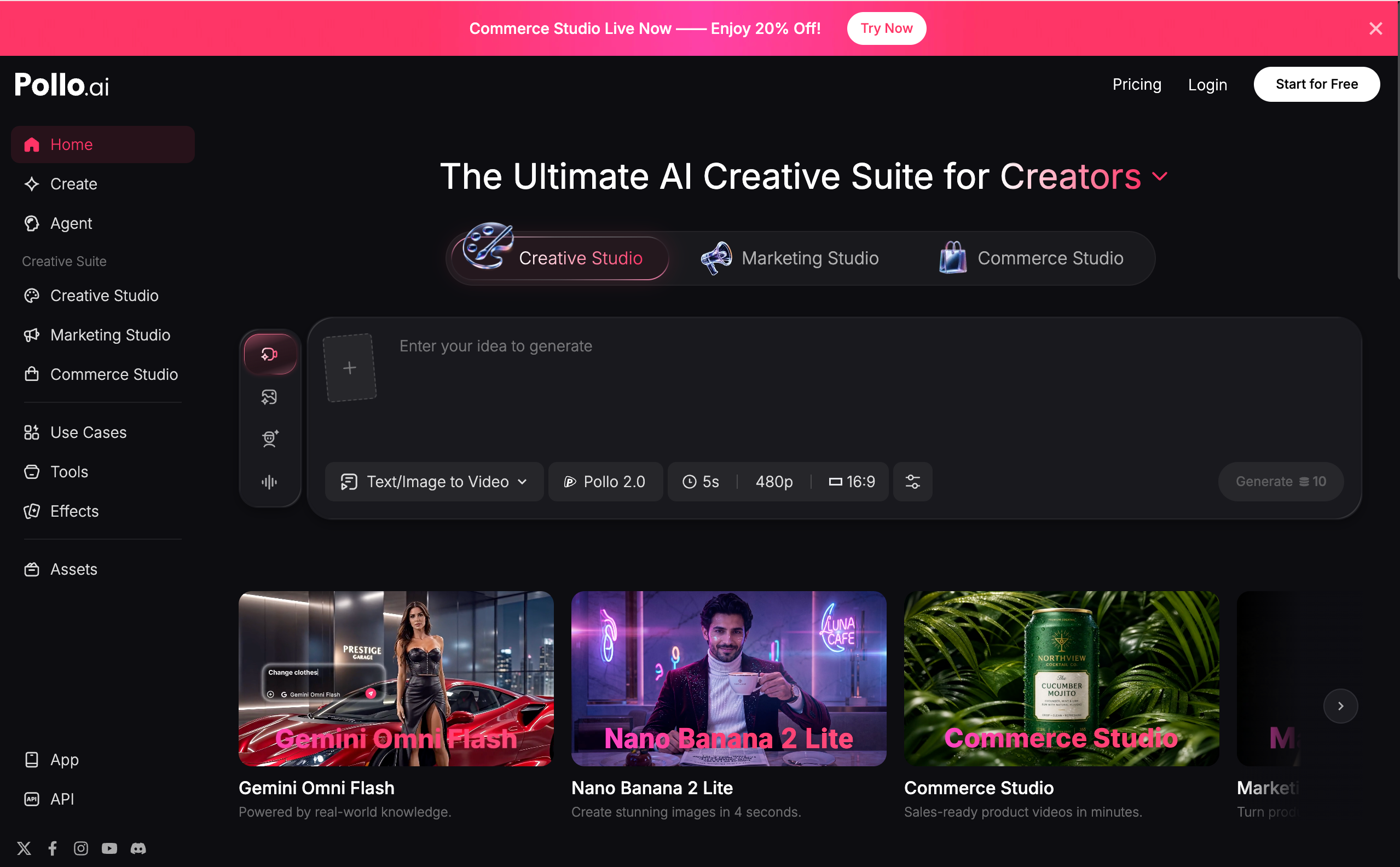
Pollo AI feels like walking into an AI video mall.
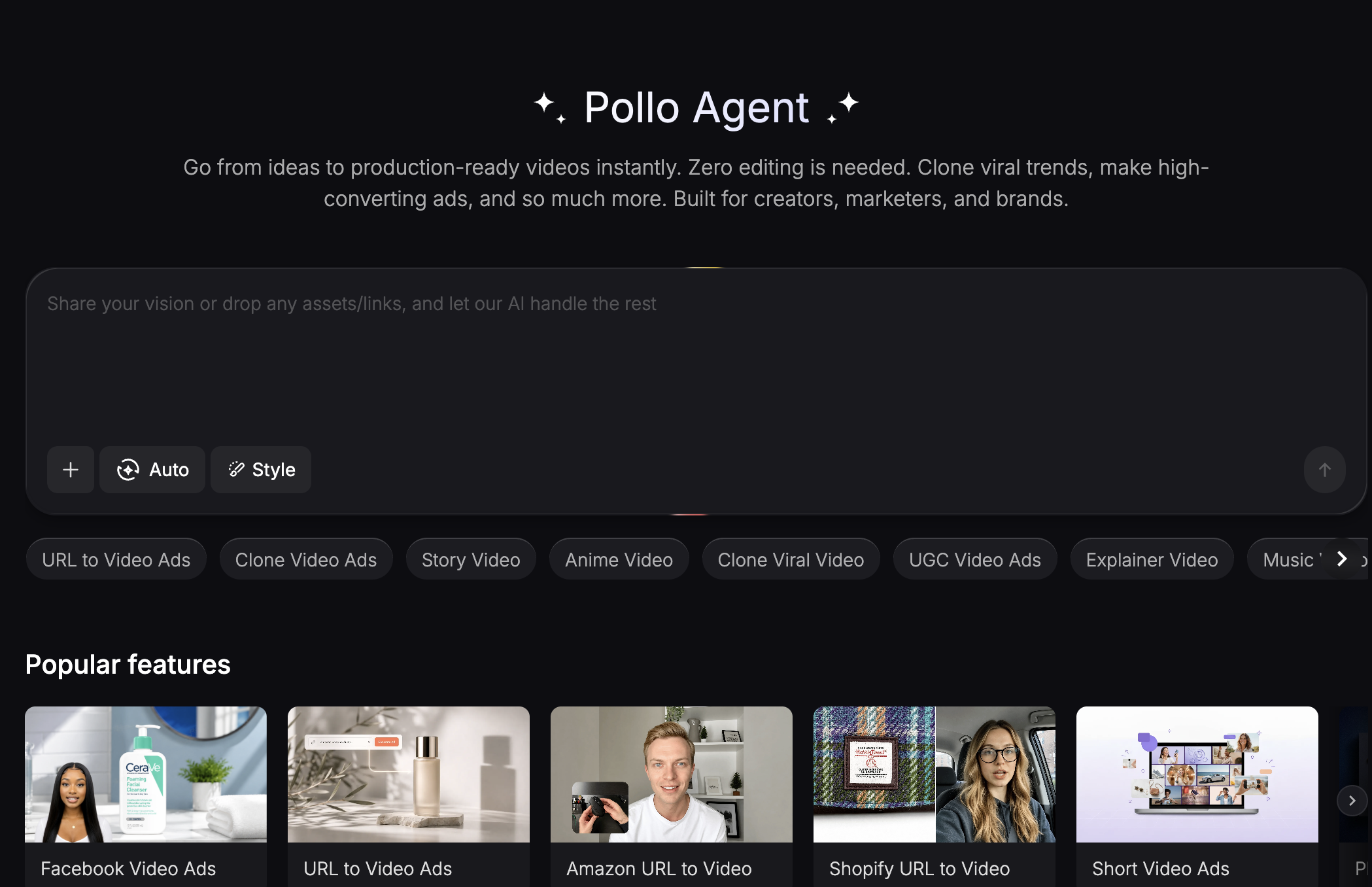
There is a creative studio, a marketing studio, a commerce studio, an agent, image tools, video tools, audio tools, avatars, product videos, UGC ads, URL-to-video ads, lip sync, video upscaling, background removal, face swap, animation effects, and a long list of AI models. It is not trying to be one simple generator. It is trying to be the place where a creator, seller, or marketer can walk in and find almost any AI media tool they need.
That is useful. It is also the reason many people eventually search for Pollo AI alternatives.
The problem with an all-in-one platform is not that it has too few options. The problem is often that it has too many. Once you know what you actually want to make, you may not need the whole mall. You may need the right studio, the right model, or the right workflow.
This guide looks at Pollo AI from that angle. Instead of asking whether Pollo AI is good or bad, we will ask a better question: what kind of creator are you, and which tool fits the job better?
If you want a general creative suite, Pollo AI is worth exploring. If you want a more focused AI video workflow, cinematic model access, talking avatars, visual restoration, viral social formats, or product-ready content, other tools may make more sense.
Why Pollo AI Became Popular
Pollo AI’s biggest strength is packaging.
The platform brings many AI media tasks into one place. Its official site presents Pollo AI as a creative, marketing, and commerce suite for generating videos, images, avatars, audio, ads, and product visuals. It includes tools for text-to-video, image-to-video, reference-to-video, video editing, video upscaling, lip sync, face swap, product videos, UGC ads, Amazon and Shopify video ads, and more.
That makes Pollo AI attractive for users who do not want to compare ten different apps before starting. A seller can create product visuals. A marketer can create ad videos. A creator can test short-form clips. A casual user can explore video effects. A brand can try product showcases.
Competitor articles usually describe Pollo AI in the same way: convenient, broad, fast for short videos, and useful for creators who want many tools in one interface. They also point out the same tradeoff: broad platforms can feel less predictable when quality, consistency, or workflow depth matters.
That is the key tension.
Pollo AI is good when you want many doors.
But if you already know which door you need, a focused tool may get you there faster.
Medeo — Best When You Want an AI Video Workflow, Not Just a Tool Shelf
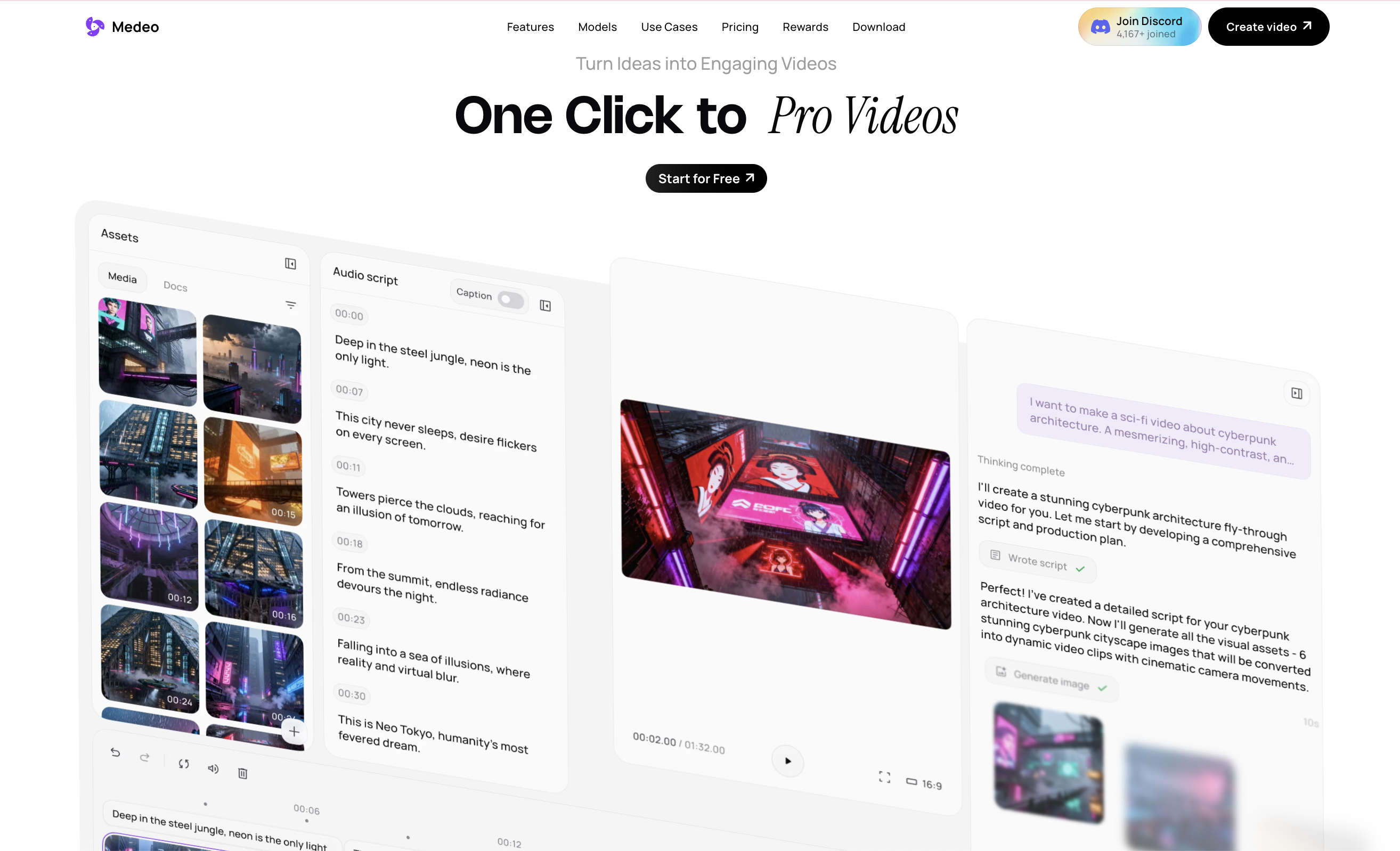
Medeo is the strongest Pollo AI alternative when the goal is structured AI video creation.
Pollo AI is broad. Medeo is more workflow-oriented. The difference is subtle but important. Pollo AI gives users many tools across creative, marketing, and commerce use cases. Medeo is built around helping users move from source material to video output through a more connected creation process.
That makes Medeo especially useful for creators who do not want to think in isolated tools. A video project may begin as a rough idea, a script, a product image, a voice note, an existing video, or a webpage. Medeo is useful because it can support different starting points and help move them toward video content.
If a creator is making story-based content, Medeo’s short drama workflow is a more interesting internal path than a generic text-to-video page
If the goal is a presenter-style video, a creator can explore Medeo’s talking avatar page:
If the content needs a social or emotional format, Medeo’s AI hug video generator is a strong example of a page built around a specific viral video use case
This is a different way to think about AI video. Instead of starting with “which tool should I click?”, Medeo encourages the user to start with “what kind of video am I trying to make?”
That matters for teams. Marketers, founders, educators, and social creators often need repeatable workflows, not random experiments. They need to make videos from ideas, refine them, reuse assets, test different model outputs, and publish across platforms.
Pollo AI is useful as a broad creative suite. Medeo is more useful when video creation itself is the center of the work.
Runway — Best for Editors Who Want AI Inside a Production Pipeline
Runway is one of the most serious Pollo AI alternatives for professional creators. It is not only an AI generator. It is also connected to editing, creative control, and post-production workflows.
Runway makes sense for users who already understand video production. These users may care about masking, motion control, composition, editing integration, and the ability to move between generation and post-production.
Compared with Pollo AI, Runway feels less like a giant shopping center and more like a high-end production room. It may not be the easiest tool for every beginner, but it gives professionals more control over the creative process. Choose Runway if your workflow already involves editing and you want AI generation to become one part of a larger production pipeline. Choose Pollo AI if you want many easy AI media tools in one place. Choose Medeo if you want an AI video workspace that is easier to approach than a professional editor but more focused than a general tool hub.
Kling AI — Best When Motion Quality Matters Most
Kling AI is often mentioned in Pollo AI alternative lists because it has a strong reputation for motion quality, realism, and physics-aware generation. It is a good option when the viewer needs to believe the movement.
This matters for prompts involving people, animals, natural movement, cinematic scenes, and image-to-video clips where motion should feel grounded.
Pollo AI includes access to multiple video models and tools, but users looking specifically for strong model behavior may want to compare individual model pages rather than use a general suite by default.
Medeo supports the same kind of model-aware thinking. For example, users who want to explore a video model focused on visual storytelling can look at Medeo’s Wan AI page
For users interested in another video model known for fast creative generation and social-friendly output, Medeo’s Hailuo AI page is also relevant
This is the bigger point: serious AI video creation is becoming model-specific. The best model for a product shot may not be the best model for a character scene. The best model for cinematic motion may not be the best model for short social content.
Pollo AI solves this by bundling many models and tools. Medeo solves it by giving creators model workflows that can connect back to the video they are actually trying to produce.
Pika — Best for Playful Effects and Social Video Energy
Pika is a strong choice when the goal is playful, stylized, or effect-driven video. It is not always the most realistic tool, but realism is not always the point. Some social content works because it is surprising. A transformation, a visual joke, a surreal moment, a stylized animation, or a dramatic effect can perform better than a polished cinematic clip. Pika understands that side of AI video.
Compared with Pollo AI, Pika feels more focused on creative effects and social experimentation. It is useful for creators who want to test playful ideas quickly.
This kind of internal linking fits better than always linking the same generic feature pages. It shows that Medeo is not only a general AI video tool. It has pages and workflows for specific creator intents.
Luma AI — Best for Cinematic Scene Exploration
Luma AI is one of the better Pollo AI alternatives when the goal is cinematic scene generation. It is especially relevant for creators who care about camera movement, visual depth, and atmospheric video clips.
A tool like Pollo AI can help users create many types of videos quickly, but cinematic work often benefits from more focused model testing. If the final clip needs to feel like a camera is moving through a real scene, model behavior matters more than tool variety.
Luma is strong for that kind of exploration.
Medeo can also support cinematic exploration from a different direction. If a creator wants a model page focused on cinematic realism and audio-visual sync, Medeo’s Happy Horse page is worth using as an internal link If the creator wants a high-profile cinematic generation model, Medeo’s Sora 2 page is another useful path
These links are useful in a Pollo AI article because they show Medeo as a place to explore multiple video models, not only as a simple prompt box.
CapCut and Dreamina — Best for Social Editing After Generation
Some creators do not need a better AI generator. They need a better finishing tool.
That is why CapCut and Dreamina often appear around AI video discussions. They are useful for short-form editing, social formatting, subtitles, effects, templates, and quick publishing workflows.
Pollo AI can generate and package many types of assets, but social creators still often need editing polish. A raw AI clip may need captions, music, pacing changes, trimming, overlays, or platform-specific formatting.
CapCut is especially useful when the final destination is TikTok, Reels, or Shorts. It is not always the best place to generate high-end AI video, but it is strong for finishing social content.
Medeo’s angle is different. It can help create the AI video material before the social edit. A creator could generate a themed AI clip in Medeo, then polish it in a social editor if needed.
Canva — Best for Teams That Need Simple Design Around Video
Canva is not a direct Pollo AI replacement for advanced AI video generation. But it is a strong tool for teams that need video inside a broader content design system.
Many businesses do not only need generated clips. They need thumbnails, social layouts, presentation graphics, brand templates, simple edits, and visual consistency across platforms. Canva is useful for that.
Compared with Pollo AI, Canva is less about cutting-edge AI model generation and more about accessible content assembly. It is strong for marketers, educators, and small teams that need design speed.
Medeo can complement this type of workflow by creating the AI video asset first. Then a team can place that asset into a branded design system if needed. This gives the article a different kind of Medeo link: not just creation, but enhancement and restoration.
Hailuo AI — Best for Fast Creative Video Experiments
Hailuo AI is often included in best AI video generator and Pollo AI alternative lists because it is accessible and creator-friendly. It is especially useful for quick experimentation, short clips, and trying different prompt directions.
Compared with Pollo AI, Hailuo is more model-specific. It does not try to be a commerce studio, marketing studio, product ads suite, and multi-tool platform all at once. That can actually be an advantage for users who want fewer decisions.
Medeo’s Hailuo AI page makes sense as an internal link because it lets Medeo capture users searching for this specific model:
This is one of the strongest ways to diversify Medeo links in a Pollo AI article. Instead of only linking feature pages, link model pages that match the user’s comparison intent.
What Pollo AI Gets Right
Pollo AI gets one big thing right: creators do not want to jump between ten tools for every project.
A modern video workflow might involve image generation, video generation, avatar creation, voice tools, product visuals, ad scripts, URL input, enhancement, and export formatting. Pollo AI tries to bring those jobs together.
That is why the product is attractive. It reduces search friction. It gives creators a large menu.
For marketers and sellers, this can be useful. A Shopify seller may not want to learn a cinematic video model. They may want a product ad. A creator may not want to compare AI image models. They may want a short social clip. Pollo AI packages those paths clearly. Its strength is breadth.
What Pollo AI Does Not Always Solve
Breadth is not the same as depth.
When users start caring about output consistency, specific model behavior, brand tone, editability, motion quality, or workflow repeatability, an all-in-one platform can start to feel less precise.
A creator may not want “all the tools.” They may want one better route through the project.
This is why best tools articles are useful. They help users choose based on the job instead of the brand name.
Pollo AI may be the right choice when the user wants a wide creative suite.
Medeo may be the right choice when the user wants a video-first workspace with more direct creative paths.
Runway may be the right choice when the user wants professional editing control.
Kling may be the right choice when motion realism matters.
Pika may be the right choice when playful social effects matter.
Canva may be the right choice when design templates matter.
The best tool is not universal. It depends on the creative problem.
How to Choose the Right Pollo AI Alternative
If the project is an ecommerce ad, start with tools that understand products, hooks, and conversion. Pollo AI is strong here, but Medeo can also help if the product idea needs to become a more flexible AI video workflow.
If the project is a cinematic clip, compare model-specific options such as Luma, Kling, Sora-style workflows, Happy Horse, Wan AI, or Hailuo.
If the project is a social meme or trend, Pika, CapCut, and use-case-focused Medeo pages may be more useful than a heavy production tool.
If the project is a talking video, avatar, explainer, or education clip, Medeo’s talking avatar page is more relevant than generic AI video search.
If the project is old footage or low-quality video improvement, a page like Medeo’s video colorizer may be more useful than a new generation tool.
If the project starts from an existing page, product URL, or article, choose a tool that understands content repurposing rather than only prompt generation.
The best rule is simple: choose the tool that matches your source material and your final output.
FAQ About Pollo AI and Its Alternatives
What is Pollo AI?
Pollo AI is an all-in-one AI creative suite for generating videos, images, avatars, audio, ads, product visuals, and marketing assets. It includes creative, marketing, and commerce studios with many AI video and image tools.
Is Pollo AI free?
Pollo AI offers free or trial access for some workflows, but many features use credits or paid plans. Users should check the official pricing page for current limits, model access, and export rules.
What is Pollo AI best for?
Pollo AI is best for users who want many AI creative tools in one place. It is especially useful for product videos, social media clips, marketing videos, UGC-style ads, image-to-video, text-to-video, and ecommerce creative workflows.
What is the best Pollo AI alternative?
The best Pollo AI alternative depends on the job. Medeo is best for broader AI video workflows, Runway is strong for professional editing, Kling is strong for motion quality, Pika is good for playful social effects, Luma is useful for cinematic scenes, and Canva is practical for design-based content assembly.
Is Medeo a Pollo AI alternative?
Yes. Medeo is a strong Pollo AI alternative for users who want a video-first AI creation workspace. It is especially useful for turning ideas, images, audio, videos, and links into video content, and for exploring specific video use cases and model workflows.
Is Pollo AI better than Medeo?
It depends on the use case. Pollo AI is broader as an all-in-one creative suite with many marketing and commerce tools. Medeo is better when the user wants focused AI video creation, specific use-case pages, and model-based video workflows.
Can I use Pollo AI for ecommerce videos?
Yes. Pollo AI has many commerce-focused tools, including product showcase videos, Amazon product videos, Shopify video ads, TikTok Shop URL-to-video, and product image tools.
Can I use Medeo for social video creation?
Yes. Medeo supports many social video workflows, including talking avatars, AI hug videos, AI kissing videos, music videos, short drama, and model-based AI video generation.
Final Thought: Pollo AI Is Useful, But Specificity Wins
Pollo AI is useful because it gives creators many tools under one roof. For users who want a large creative suite with video, image, audio, avatar, marketing, and commerce tools, that breadth is valuable.
But once a creator knows what they want to make, specificity matters more than size.
A product video needs a different workflow from a talking avatar. A cinematic scene needs a different model from a social meme. A restored clip needs a different tool from a new AI-generated ad. A sentimental AI hug video needs a different structure from a Shopify product promo.
That is why the best Pollo AI alternative is not always one platform. It is the tool that matches the next creative job.
Medeo earns its place in that shortlist because it is not only another AI video generator. It gives creators specific paths for video creation, from talking avatars and emotional social formats to video colorization and model-based generation.
Pollo AI is the mall.
Medeo is the studio you go to when you know what kind of video you want to make.